SEO
SHORT ANSWER
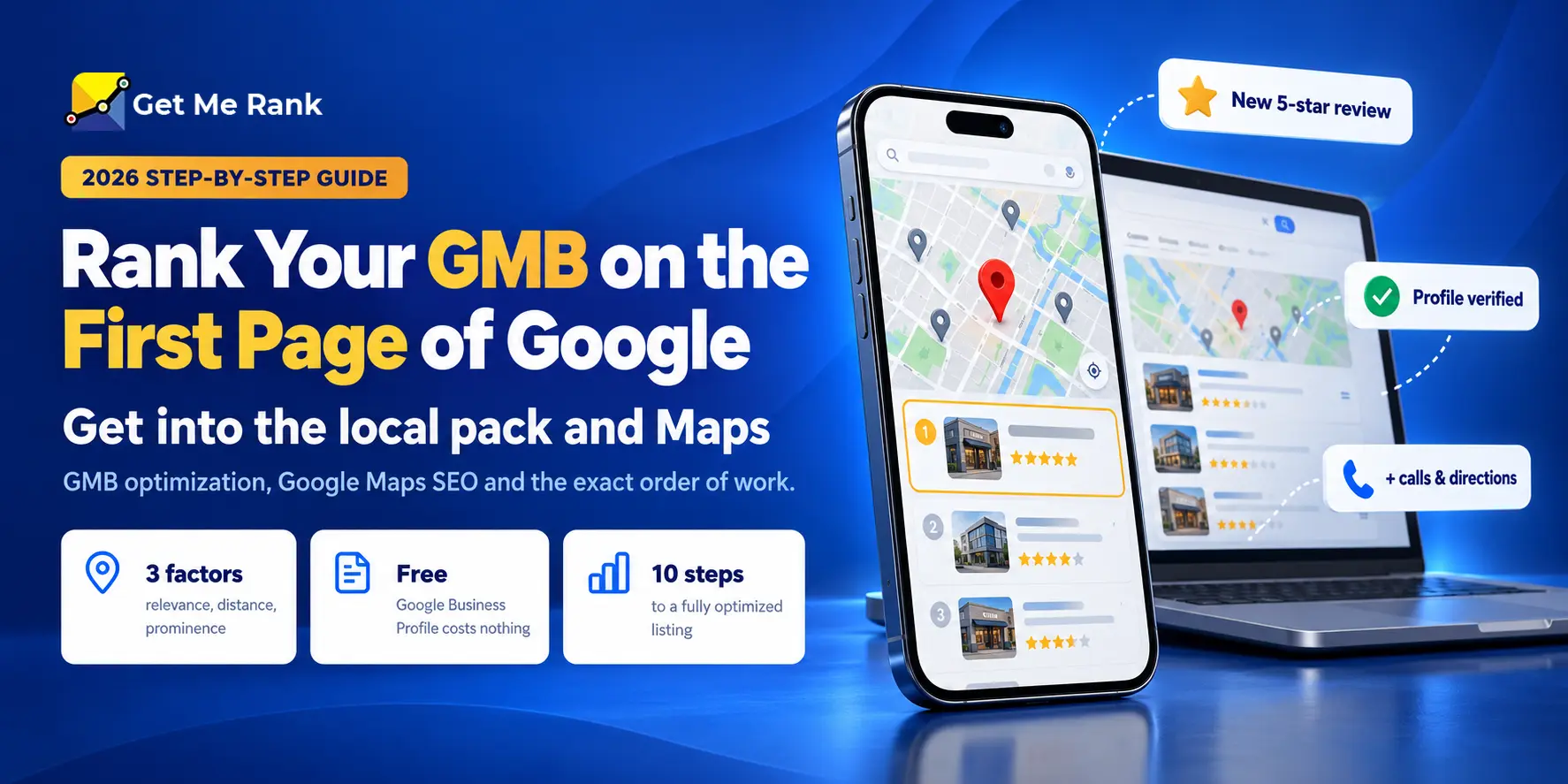
If you want to know how to rank on Google for local searches, start with your GMB (Google My Business), now called Google Business Profile. It decides how you appear in the local pack and on Maps. To reach the Google first page, verify and complete the profile, pick the right primary category, keep your name, address, and phone number identical everywhere, earn real reviews, and link the profile to a strong local page. Nobody can guarantee a position, but doing these in order is the most reliable route there is.
Key Takeaways
- GMB is now called Google Business Profile, and it controls the map results most local customers click first.
- For a local search, the Google first page has four parts: ads, AI features, the local pack, and organic results. Only the local pack comes from your GMB.
- Google ranks local results on relevance, distance, and prominence. You can’t change distance, so put your effort into the other two.
- Most profiles that stall are held back by basics, like the wrong category, inconsistent details, or too few reviews, not by advanced tactics.
- Adding keywords to your business name, using a fake address, or paying for reviews can get the profile suspended.
- Expect weeks for simple fixes and months in competitive markets. Walk away from anyone who guarantees a ranking.
What Does “Google First Page” Actually Mean for a Local Business?
For a local search, the Google first page isn’t ten blue links anymore. It’s a stack of different result types, and your GMB only competes for one of them: the map listings near the top. Knowing which part you’re actually trying to win saves a lot of wasted effort.
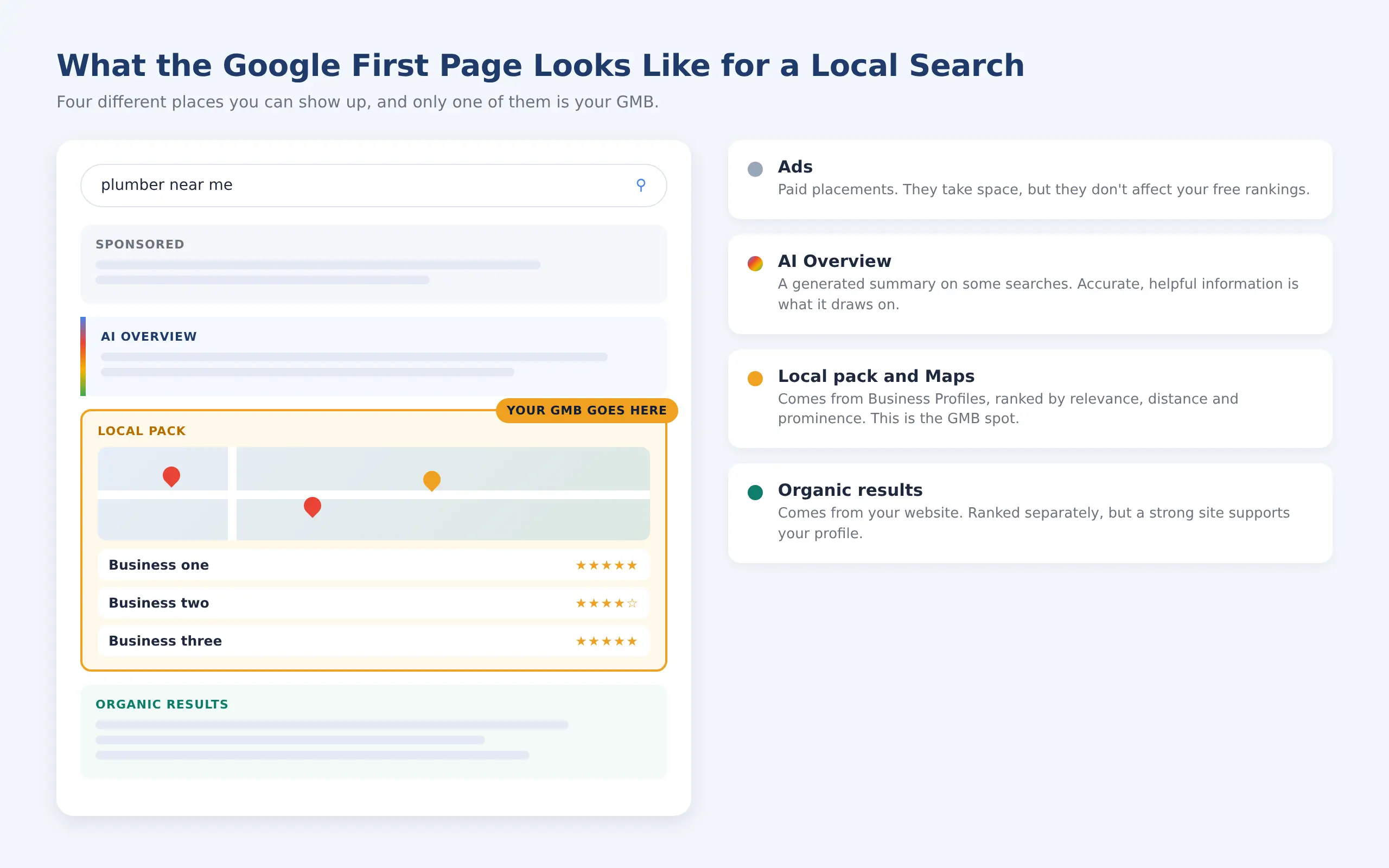
The local pack is the only part of the first page that comes from your GMB.
The Local Pack and Maps
Search for a service plus a city, or anything with “near me”, and Google usually shows a map with three business listings under it. Those listings come from Business Profiles, not from your website. When local business owners say they want page one Google results, this is almost always the spot they mean, because it’s where the calls and direction requests come from.
Organic Results
The regular website listings sit below or around the map. They’re ranked on your website’s content, relevance, technical health and authority, and they’re ranked separately from your profile. A strong website helps your profile, but a page-one website doesn’t automatically put you in the map pack, and the reverse is true too.
How to Rank Your GMB on the First Page of Google: SEO and GMB Steps That Work
AI Overviews, Ads and Everything Else
Many results pages also show ads, AI-generated summaries, “People also ask” boxes and videos. They push everything else down, so ranking first in the local pack doesn’t always mean you’re the first thing a customer sees on their screen.
Why Your Page One Isn’t the Same as Your Customer’s
Google tailors local results to the searcher’s location, device, language and history. Someone two kilometres away can see a completely different map pack from the one you see at your desk. That’s why a single search from your office tells you very little about where you really rank.
What Is GMB, and How Does GMB SEO Work?
What Is GMB?
So, what is GMB exactly? GMB stands for Google My Business, Google’s free tool for managing how a business appears on Search and Maps. Google renamed it Google Business Profile, but most people still search for the old name, so you’ll see both used for the same thing.
Your profile holds the details customers check before they call: your name, address, phone number, hours, category, photos and reviews. GMB SEO is the work of improving that profile so it shows up for more of the right searches. It’s one part of local SEO, which also covers your website, your listings on other sites and local links.
DID YOU KNOW
Google says businesses with complete and accurate information are more likely to show up in local search results. Filling in every field that applies to you is the cheapest ranking improvement there is.
How Does Google Maps SEO Work?
Google Maps SEO comes down to three factors Google itself names for local ranking: relevance, distance and prominence.
| Factor | What it means | Can you control it? |
|---|---|---|
| Relevance | How well your profile matches what someone searched for | Yes |
| Distance | How far you are from the searcher, or from the place they typed | No |
| Prominence | How well known your business is, including reviews, links and mentions across the web | Yes |
You can’t move your shop closer to every customer, so the whole game is relevance and prominence. Every step later in this guide improves one or both.
How Do You Check Where You Rank on the Google First Page Right Now?
Check before you change anything. Without a starting point, you’ll never know which fix actually worked.
- Open the Performance section of your Business Profile and note which searches showed your business.
- Write down this month’s calls, direction requests and website clicks. That’s your baseline.
- Search your main service plus your city in a private browser window, as a rough check.
- Repeat the search from a few spots around your area, because results change with distance.
- If you want a fuller picture, use a local rank-tracking tool that shows your position across a grid of locations.
Treat any single search as a rough guide. The trend in your profile’s own data over several months is far more reliable.
PRO TIP
Check your ranking on your phone while you’re a few kilometres from your business, not just at your desk. That’s how most of your customers will actually see you.
Why Isn’t Your GMB on the First Page Yet?
In most cases, a profile is held back by one or two basic problems rather than something advanced. Find the cause first, because the fix for a wrong category is completely different from the fix for a competitor who’s simply closer.
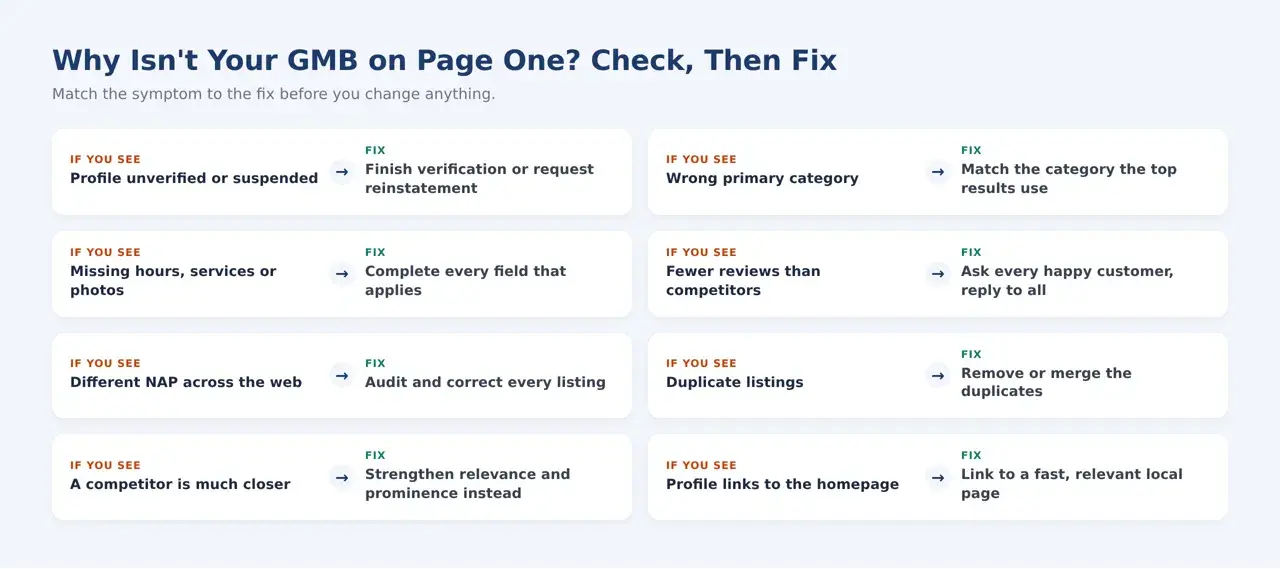
Match the symptom to the fix before you change anything on your profile.
Two causes deserve a special mention. Duplicate listings split your reviews and signals between profiles, so neither one ranks well. And if a competitor sits much closer to most searchers, no amount of optimization will fully overcome that. You’re competing on relevance and prominence, so build those up and widen the searches you can win.
How to Rank on Google With GMB: Steps in Order
Here’s how to rank on Google locally, in the order we’d work through it with any new profile. Each step makes the next one more effective, so skipping ahead rarely pays off.
How Do You Do GMB Optimization?
GMB optimization means making your profile complete, accurate, and active, so Google can confidently match it to the right searches. These are the ten steps.
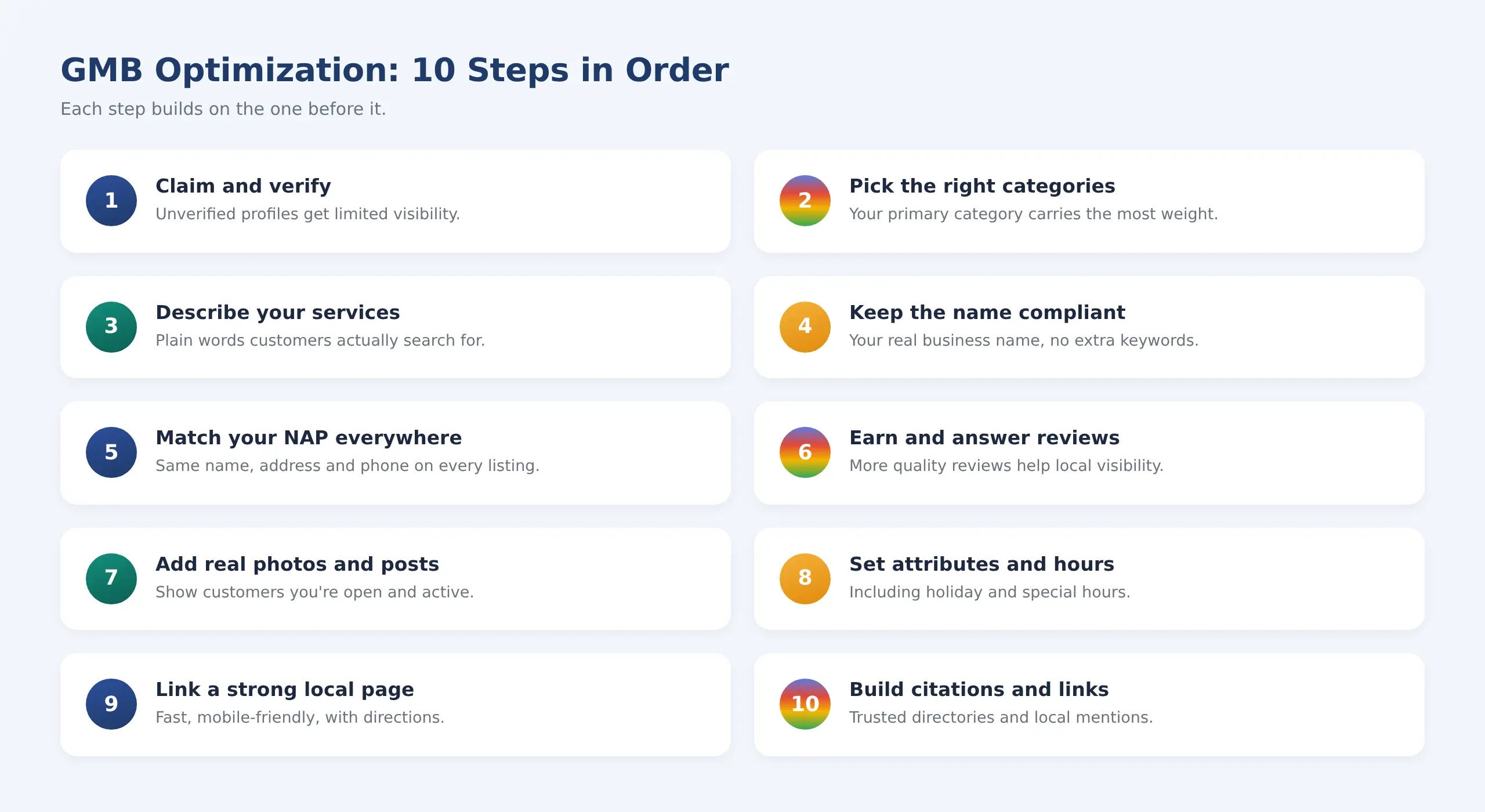
Ten GMB optimization steps, in the order that gets results fastest.
1. Claim and Verify Your Profile
Claim the listing and complete every field you can. Until a profile is verified, you can’t manage it properly. Google offers different verification methods depending on the business, such as phone, text, email, video or postcard, so use whichever it offers you.
2. Choose the Right Primary Category
Of all the settings on your profile, the primary category does the most work. Pick the one that describes your main business, not everything you do, then add secondary categories only where they genuinely apply. A dental clinic that chooses “Dentist” as its primary category will show up for very different searches than one that chooses “Cosmetic dentist”, so think about what most of your customers actually search for.
GETMERANK TIP
Search your main service and note the primary category used by the top three businesses in the local pack. If they all share one and yours is different, your category may be what’s holding you back.
3. Write a Clear Description and List Your Services
Describe what you do, who you serve and where, in plain language a customer would use. Then list every service separately. If you’re not sure which words customers use, a little keyword research will show you how they phrase these searches.
| Weak description | Strong description |
|---|---|
| “We are the best, most trusted and number one plumbing company offering quality services.” | “Family-run plumbers serving Kothrud and Baner since 2012. We fix leaks, install geysers and handle emergency call-outs, 7 days a week.” |
4. Keep Your Business Name Exactly as It Is
Use your real-world business name, the one on your signboard and invoices. Adding keywords or locations to it breaks Google’s guidelines and is one of the most common reasons profiles get suspended.
| Compliant | Not compliant |
|---|---|
| Sharma Plumbing | Sharma Plumbing | Best Plumber in Pune | 24×7 |
5. Keep Your Name, Address and Phone Identical Everywhere
Your name, address and phone number (NAP) should match exactly on your website, directories and social profiles. Small differences, like an old number or “Rd” in one place and “Road” in another, make it harder for Google to trust that these listings are all the same business. Audit them every few months.
6. Earn Reviews and Reply to Every One
Google says more reviews and positive ratings can help your local ranking, and reviews are often what makes a customer pick you over the listing next to yours. Ask happy customers at the moment they’re happiest, make it easy with a direct link, and reply to every review. Never offer discounts or gifts in exchange for reviews, because that breaks Google’s policies.
Replies matter most on the bad reviews, because future customers read them. A short, calm reply works best: “Thanks for telling us, and sorry the visit ran late. We’ve spoken to the team, and we’d like to put it right. Please call us on our main number and ask for the manager.”
PRO TIP
Create your profile’s review link once and save it as a QR code on your counter, receipts, and invoices. Most customers are happy to leave a review; they just don’t want to search for where to do it.
7. Add Real Photos, Videos and Posts
Upload real photos of your premises, team and work, and keep adding new ones. Use posts for offers, updates, and events. Stock photos do the opposite of what you want: customers can spot them, and they make a real business look generic.
8. Fill In Attributes and Keep Hours Accurate
Add every attribute that genuinely applies, such as accessibility or payment options, and keep regular, special and holiday hours up to date. Few things lose a customer faster than turning up to a shop that Google said was open.
9. Link the Profile to a Strong Local Page
Send profile visitors to a fast, mobile-friendly page with clear contact options, directions, and the details they’re looking for, not just your homepage. Add LocalBusiness schema so search engines can read your name, address, and hours. If you have several locations, give each one its own page with genuinely different content. A slow page wastes the click your profile earned, so check its Core Web Vitals too.
10. Build Local Citations and Links
List your business accurately in trusted directories and earn mentions from local partners, sponsorships, and local press. This builds prominence, and it’s the slowest step, which is why it comes last. Our guide to Google ranking optimization explains how local and organic signals support each other.
How Do You Rank Higher in Google Maps Itself?
This is where Google Maps SEO gets more specific. Maps follows the same three factors, but distance carries even more weight. Decide honestly whether you show an address or set a service area, based on whether customers come to you or you go to them, and never use an address where you don’t actually operate. Accurate details and recognisable photos of your entrance help people find you, which shows up as direction requests in your performance data.
How Do You Know It’s Working?
Look at your profile’s performance data every month: calls, direction requests, website clicks and the searches that showed your business. Note what you changed and when. Judge results over several months rather than week to week, because local rankings naturally move around.
How Long Does It Take to Reach the Google First Page?
It depends on how complete your profile is, how competitive your area is, and how close you are to searchers. Google’s own guidance says some changes take effect within a few hours, while others take several months. These ranges are common patterns, not promises.
| Situation | Typical pattern |
|---|---|
| Fixing an incomplete Business Profile | Changes can show within weeks |
| Improving a profile that’s close to the local pack | Often weeks to a few months |
| A new profile in a low-competition area | Often a few months |
| A new profile in a competitive market | Many months, sometimes longer |
| Highly competitive searches | Long-term effort, and may not be realistic without strong prominence |
HIGHLIGHT
Balanced take: Google states plainly that no one can guarantee a #1 ranking. If someone promises your GMB will reach the first page by a certain date, treat it as a warning sign, not a selling point.
Which GMB Optimization Tactics Matter Most?
Start with the fast, low-effort fixes, then put steady effort into the slower ones that build lasting rankings. Most businesses get the biggest early gains from the first three rows of this table.
| Tactic | Helps with | Speed | Effort |
|---|---|---|---|
| Complete, accurate GMB optimization | Relevance | Fast to medium | Low |
| Correct categories and services | Relevance | Fast | Low |
| Consistent name, address and phone | Trust | Medium | Low |
| Reviews and replies | Prominence | Medium | Medium |
| Fresh photos and posts | Engagement | Medium | Low |
| Local landing pages | Both | Medium | Medium |
| Citations and local links | Prominence | Slow | High |
How Are AI Features Changing Local Results?
Google has retired the public Q&A section on Business Profiles and is replacing it with an AI-powered “Ask” feature in Maps, which answers customer questions using the business’s own answers and relevant reviews. Availability differs by region, so check your own profile. The practical takeaway is simple: accurate details and genuine, detailed reviews now feed the answers customers see, not just your ranking. Google has also said the same SEO fundamentals apply to its AI features. To prepare your website as well, read our guide to Google AI Overviews optimization.
What Mistakes Keep Businesses Off Page One?
GMB SEO Mistakes That Risk Suspension
The most damaging GMB SEO mistakes are shortcuts that break Google’s guidelines. They can work briefly, then cost you the whole profile.
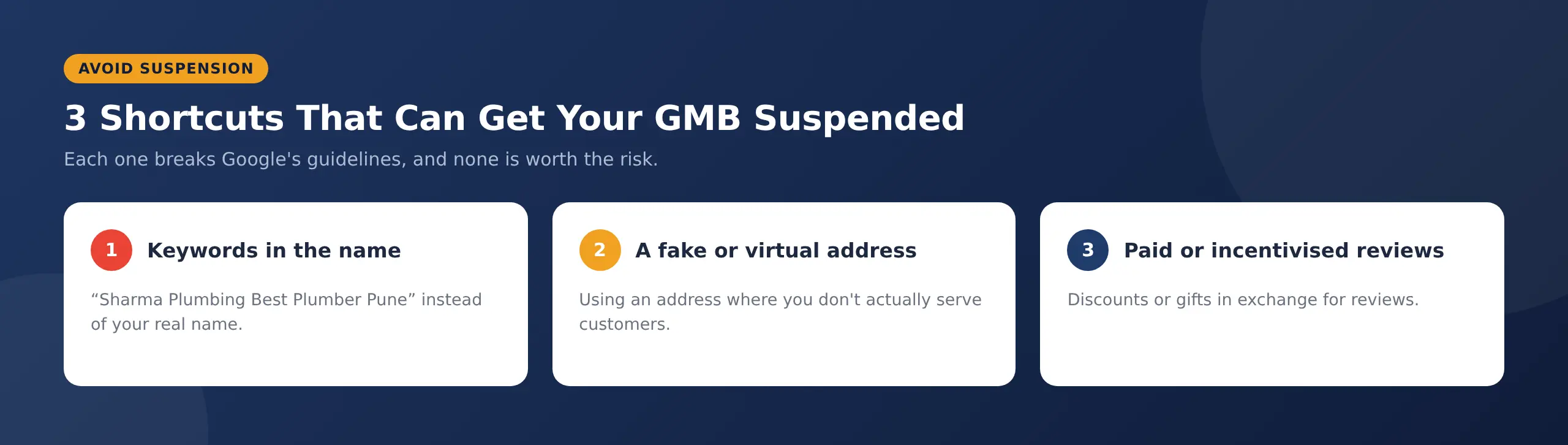
Three shortcuts that break Google’s guidelines and can get a profile suspended.
Other common mistakes don’t risk suspension, but they quietly hold rankings back:
- Inconsistent names, addresses, or phone numbers
- Ignoring reviews or replying defensively
- Stock photos instead of real ones
- Outdated hours and details
- Duplicate listings left unmerged
Website Mistakes That Undercut Your Profile
- Linking the profile to a slow or poorly built page
- Ignoring how the page works on mobile
- Thin or copied location pages that only swap the town name
- One page trying to cover every location
How Get Me Rank Helps You Reach Page One Google Results
At Get Me Rank, we treat local rankings as a process, not a promise. Every engagement starts with an audit of your Business Profile and website, because the fix depends on what’s actually holding you back. From there, we optimize the profile, build a review strategy, clean up citations, and strengthen local authority, then report every month on visibility, calls, direction requests, and leads. See how our local SEO services work.
READY TO GROW?
Want your GMB in the local pack? Book a free strategy call, and we’ll audit your Business Profile and show you which fixes will move it closest to page one.
FAQs
Is GMB free to use?
Yes. GMB, now called Google Business Profile, is completely free to create, verify, and manage. You only pay if you choose to run Google Ads or hire someone to manage it for you.
What is GMB optimization, and how often should you do it?
GMB optimization means keeping your profile complete, accurate, and active. Set it up properly once, then add photos or posts and reply to reviews every week or two, and review your details and performance data every month.
Can you do GMB SEO without a website?
Yes. A Business Profile can rank without a website, and Google lets you create one without it. But a strong local page gives Google more information about your business and gives customers somewhere to go, so GMB SEO works better with one.
How do you get on the Google first page for free?
Claim and complete your Business Profile, collect reviews, keep your details accurate, and list your business in trusted directories. These cost time instead of money, and results aren’t instant.
Can you rank in areas where you don’t have an address?
Only to a point. Distance is one of Google’s three local ranking factors, so your profile usually ranks best near your location or within the service area you set. To reach further, create genuinely useful location pages on your website for the areas you serve.
Should you pay someone who guarantees a first-page ranking?
No. Google states that no one can guarantee a #1 ranking on Google and advises looking elsewhere if an SEO promises one. A good partner explains the process and reports on progress instead.
Can Get Me Rank optimize my GMB for me?
Yes. Get Me Rank audits your Business Profile and website, fixes categories, details, and consistency, builds a review strategy, cleans up citations and reports on calls, direction requests, and leads every month.
Conclusion
Getting your GMB onto the Google first page isn’t about tricks. It’s about doing the basics in the right order and keeping them up. Understand which part of page one you’re competing for, check where you really stand, fix whatever is holding you back, then build reviews, consistency, and local authority month by month. Most businesses that get into page one Google results do it this way: steadily, without shortcuts, and by watching their numbers rather than chasing promises.