
Uncategorized
Short Answer
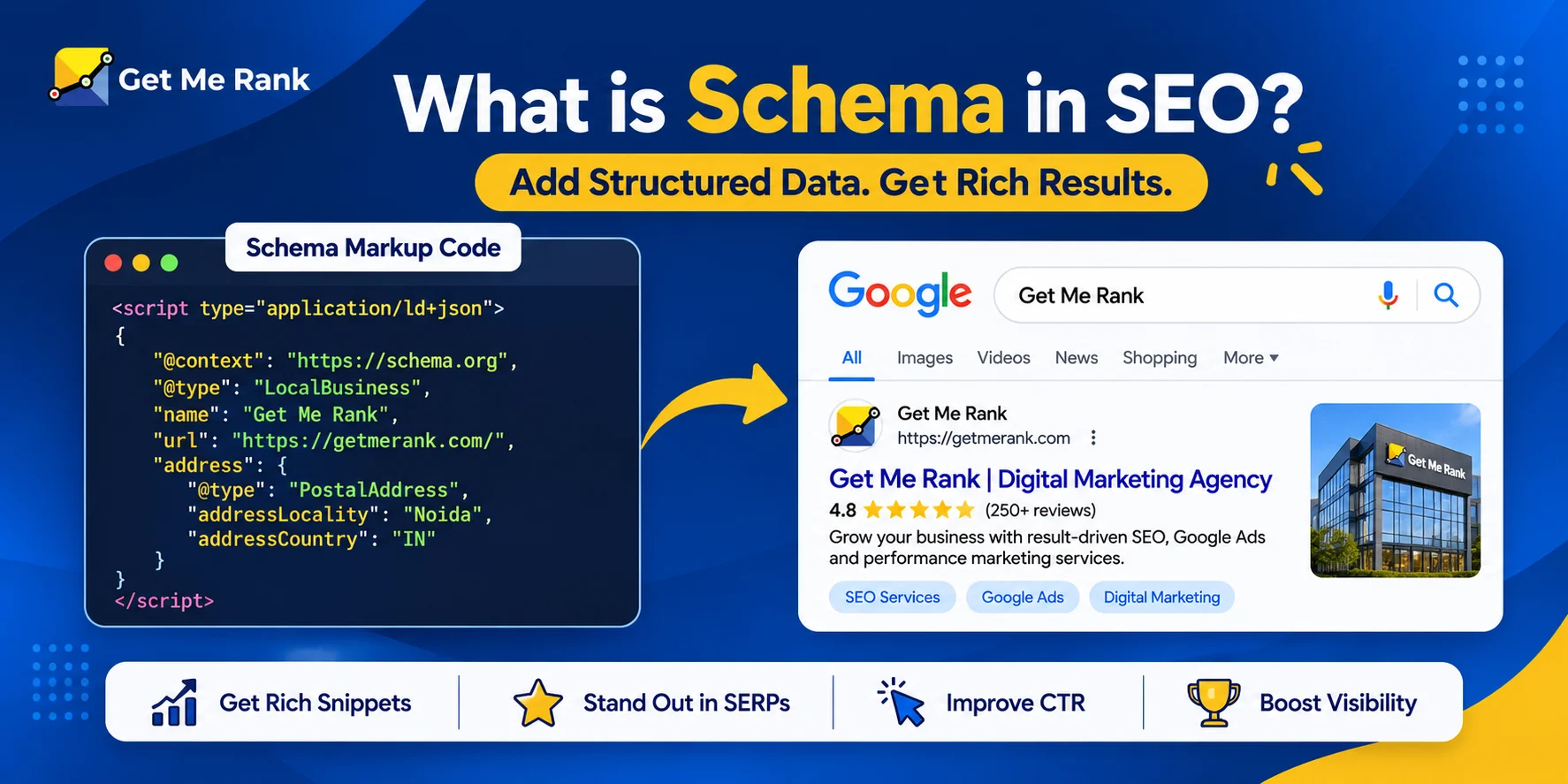
Schema in SEO is structured data, written in the Schema.org vocabulary, that you add to a page so search engines understand exactly what it covers. Common types include Organization, WebPage, Service, LocalBusiness, Article, and Product. It isn’t a direct ranking factor, but accurate JSON-LD markup can make a page eligible for rich results.
Key Takeaways
- Schema markup labels the meaning of your content for search engines. It doesn’t change how the page looks.
- Google recommends JSON-LD, the easiest format to add and maintain.
- Schema isn’t a direct ranking factor, but it can support rich results and clearer interpretation.
- Most business sites should start with organization, webpage, and service markup, then add types that fit each page.
- Only mark up what visitors can actually see on the page.
- Validate every change, and be wary of anyone who promises a rich result.
What Is Schema in SEO?
Schema is a shared vocabulary for labelling what’s on a web page. You add it as a small block of code, and search engines get a clear read on details like a business name, a price, an author, or an event date. Visitors never see it. You may also hear it called schema markup or structured data, and the enhanced listings it can unlock are often called rich snippets or rich results.
The point is simple. A search engine can guess what a page is about from the text. Schema removes the guessing. If your page mentions Jaguar, markup tells the crawler whether you mean the car or the animal.
Did You Know? Schema.org launched in 2011 as a joint effort by Google, Bing, and Yahoo, with Yandex joining soon after. The vocabulary now covers hundreds of types.
What Is Schema in SEO? Types of Schemas, Examples, and How to Add Them
Schema vs. Structured Data vs. Schema Markup
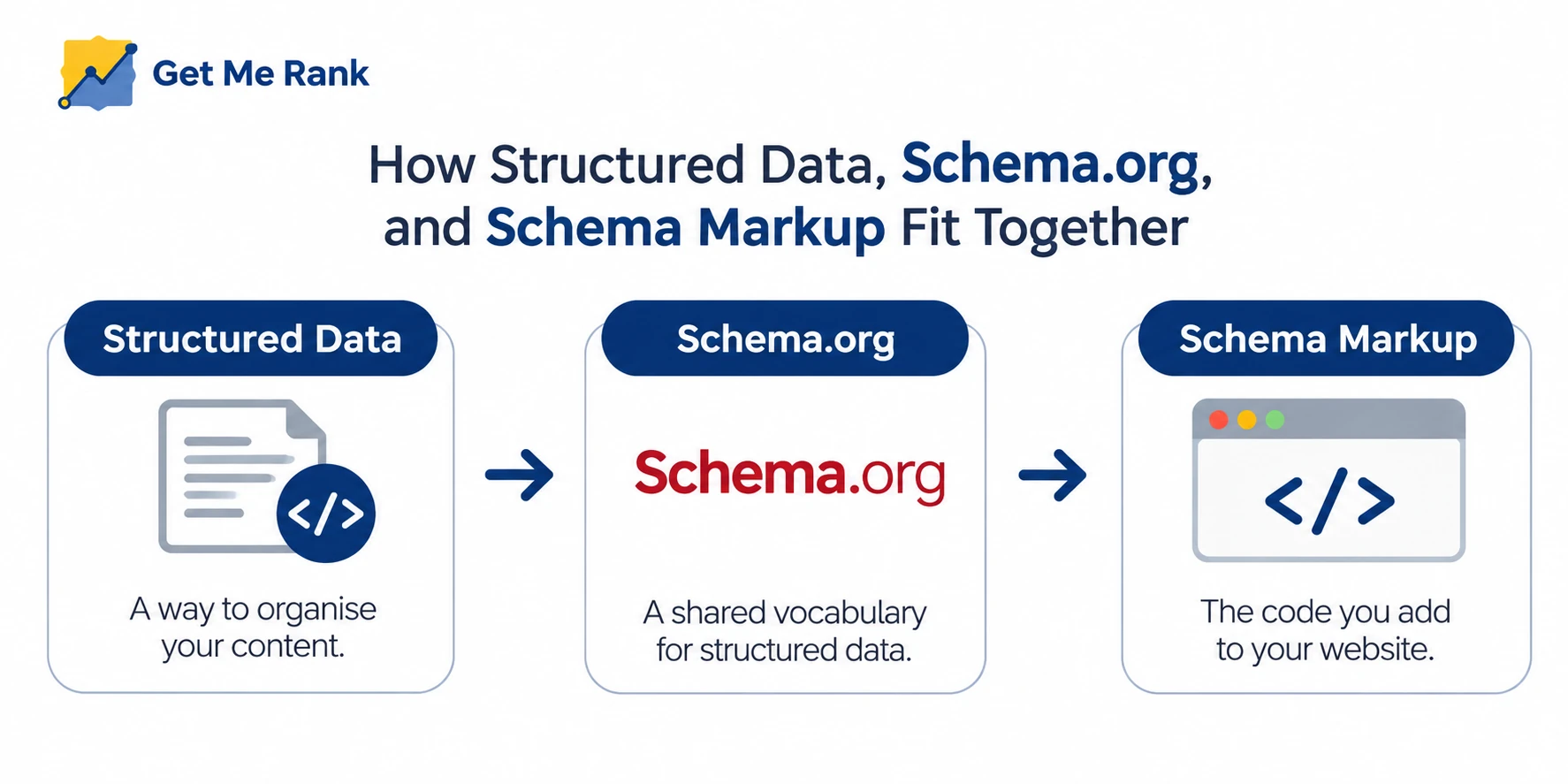
These three terms get used as if they’re the same thing. They’re related, but not identical.
- Structured data is the general idea of organizing information in a predictable format.
- Schema.org is the vocabulary used to describe that information.
- Schema markup is the code you add to a page using that vocabulary.
In day-to-day SEO talk, people use all three loosely. You’ll rarely be misunderstood.
How Do Search Engines Use Schema?
They read it while crawling and indexing a page. Markup helps them pick out the entities on the page, such as a company, a product, or a person, and understand how those things relate to each other.
When a page is eligible, search engines can also use the markup to show rich results. These are enhanced listings with extras like ratings, prices, or event dates.
Which Format Should You Use: JSON-LD, Microdata, or RDFa?
Use JSON-LD. It sits in its own script block, so it stays out of your visible HTML, and Google recommends it as the easiest to add and maintain.
Microdata and RDFa work by adding attributes to individual HTML elements. On a large page, that gets messy fast. Keep them for older systems where JSON-LD isn’t possible. Every example in this guide uses JSON-LD.
Does Schema Help SEO and Rankings?
Not directly. Google has said structured data isn’t used for ranking, so don’t expect a jump in position after adding it. The benefit is indirect: clearer understanding and, in some cases, a better-looking listing. If you’re after what does move rankings, start with our guide to Google ranking optimization.
What Schema Does Not Do
- It won’t lift your position by itself.
- It doesn’t guarantee a rich result. Google decides when to show one.
- It can’t rescue thin, outdated, or unhelpful content.
- It stops working in your favor when the markup contradicts what’s on the page.
What Schema Can Help With
- Rich result eligibility. Correct markup can make a page eligible for enhanced listings, such as prices or availability.
- Clearer understanding. Search engines get fewer chances to misread your page.
- Higher click-through rate. When a rich result does appear, people see useful details before they click, which can bring more visits without a change in position.
- Consistency. Search engines and other tools read the same labels, so the story about your business stays the same everywhere.
Pro Tip: Judge schema by what it does for impressions you already earn. A better click-through rate on existing rankings is the realistic win.
How Long Does It Take to See Results?
It depends on how quickly Google recrawls the page, which can take days or weeks. Even then, some markup only helps understanding and never changes how your listing looks.
Skip the single-search check. Watch for error-free reports and click-through trends in Search Console over several weeks.
What Are the Main Types of Schemas?
Schema.org lists hundreds of types, but most business sites only ever need a handful. The ones below are the types of schema in SEO that most business sites actually use.
List of Schemas and When to Use Each
| Schema | Best for | Typical page |
|---|---|---|
| Organization | Who you are: name, logo, contact details, official profiles | Homepage or About page |
| WebPage | A single page and how it fits into your site | Every page |
| Service | A service you offer, who provides it, and where | Service pages |
| LocalBusiness | A business with a location or service area | Location or contact pages |
| Article or BlogPosting | Blog posts and editorial content | Blog posts |
| Product with Offer | Items for sale, with price and availability | Product pages |
| Review or AggregateRating | Genuine ratings tied to a product | Product or review pages |
| Event | Dated events with a location | Event pages |
| BreadcrumbList | The navigation path to a page | Pages with breadcrumbs |
| VideoObject | Videos on a page | Pages with video |
Beyond this list, Person (for authors and founders), Recipe, and JobPosting are common for specific kinds of content.
Which Schema Types Does Google Support for Rich Results?
This list changes. Check Google’s Search Gallery before you plan around a rich result.
| Schema | What it can enable | Note |
|---|---|---|
| Product | Price, availability, ratings | Only when the page is eligible |
| Review snippet | Star ratings | Reviews of your own business on your own site aren’t eligible |
| Article | Article details in some features | Use a real author and dates |
| LocalBusiness | Business details in local features | Match your Business Profile |
| BreadcrumbList | A breadcrumb trail in the listing | Must match the visible breadcrumbs |
| Event | Event listings | Needs dates and a location |
| Organization | Helps Google understand your name and logo | No standard result card |
| WebPage and Service | Understanding only | No dedicated rich result |
Organization Schema Markup
Organization markup tells search engines who’s behind a website. It usually carries your name, URL, logo, and links to your official profiles through the sameAs property. Put it on your homepage or About page and keep every detail identical to your Business Profile and other listings.
Here’s a simple example with placeholder details:
<script type="application/ld+json">
{
"@context": "https://schema.org",
"@type": "Organization",
"@id": "https://www.example.com/#organization",
"name": "Example Company",
"url": "https://www.example.com",
"logo": "https://www.example.com/logo.png",
"sameAs": [
"https://www.facebook.com/example",
"https://www.linkedin.com/company/example"
]
}
</script>
Accuracy matters more than volume here. Add only details that are true and current.
Webpage Schema
This markup describes one page and how it connects to the rest of your site. WebPage has more specific subtypes, including AboutPage, ContactPage, CollectionPage, and ProfilePage. Use the most specific one that fits.
A page can also point to your website and organization using isPartOf and publisher:
<script type="application/ld+json">
{
"@context": "https://schema.org",
"@type": "WebPage",
"@id": "https://www.example.com/services/#webpage",
"url": "https://www.example.com/services/",
"name": "Our Services",
"isPartOf": { "@id": "https://www.example.com/#website" },
"publisher": { "@id": "https://www.example.com/#organization" }
}
</script>
Service Schema
Service markup describes something you offer: its name, type, provider, and the area you serve. Use it on a page built around one service, and make sure it matches the text visitors can read.
Google has no dedicated rich result for it, so the payoff is clarity, not a visible change in results.
<script type="application/ld+json">
{
"@context": "https://schema.org",
"@type": "Service",
"name": "Local SEO Service",
"serviceType": "Local SEO",
"description": "Business Profile optimization and local ranking support.",
"provider": { "@id": "https://www.example.com/#organization" },
"areaServed": { "@type": "City", "name": "Example City" }
}
</script>
If you offer several services, give each service page its own markup instead of bundling everything onto one page.
GetMeRank Tip: When we plan markup for a service business, we define the organization once and have every service page point back to it. That way a change to your logo or contact details gets made in one place, not twenty.
Local Business Schema
If you have a physical location or a defined service area, LocalBusiness markup (or one of its more specific subtypes) covers your name, address, phone number, hours, and location. Keep it consistent with your Google Business Profile, because mismatched details create doubt. For the profile side of local visibility, see our guide on how to rank your GMB on the first page of Google.
A Note on FAQ and HowTo Schema
This is where older guides are now wrong. Google stopped showing HowTo rich results in 2023, and on May 7, 2026 it ended FAQ rich results for all sites. Adding either type to an ordinary business page won’t change how it looks in Google.
The markup isn’t forbidden. Google has said existing FAQ markup can stay, and it doesn’t hurt your site. But treat it as optional, and don’t sell it as a way to win extra space in results.
Which Schema Should You Use on Each Page?
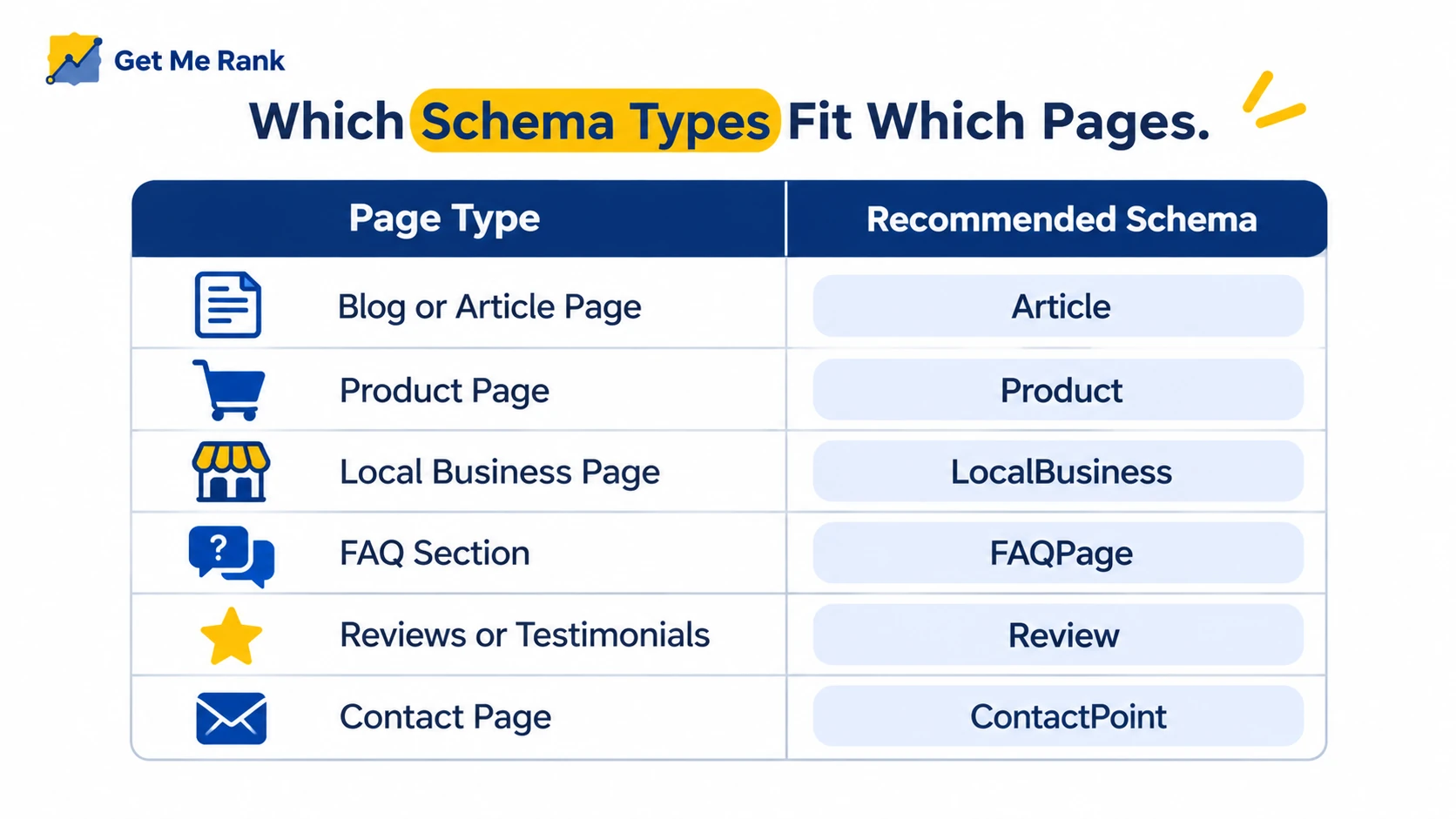
Match the markup to what the page is. The table below gives a sensible starting point.
Schema by Page Type
| Page | Suggested schema | Notes |
|---|---|---|
| Homepage | Organization, WebSite, WebPage | Define the organization once and reference it elsewhere |
| About page | AboutPage, Organization, Person | Link founders or authors with sameAs |
| Service page | Service, WebPage | Match the visible service description |
| Location page | LocalBusiness, WebPage | Keep details identical to your Business Profile |
| Blog post | Article or BlogPosting, Person, BreadcrumbList | Include a real author and dates |
| Contact page | ContactPage, Organization | Match the phone and address shown |
| Product page | Product, Offer | Add reviews only if they’re genuine and visible |
Blog posts are the easiest place to start because their structure is predictable. A post built on a clear SEO content writing strategy already has an author, date, headline, and main topic, so Article markup is mostly a matter of filling in what exists.
Match the Schema to the Main Content of the Page
Google’s guidance is that markup should describe the primary element of the page. A how-to guide with a short FAQ at the bottom is an article, not a set of questions. In the same way, don’t put Product markup on a category page that lists many items.
Check Google’s Search Gallery and the Competition
Google’s Search Gallery shows which types can produce rich results. You can also view a competitor’s page source and search for ld+json to see what they use.
Treat that as research. Their pages say different things from yours, so copying their code will give you wrong data.
Avoid Marking Up Content Users Can’t See
Every property should describe something a visitor can see. Hidden prices, invented reviews, and placeholder text can cause your markup to be ignored and may lead to a manual action.
How Do You Add Schema Markup to Your Website?
There are four practical routes. Pick the one that matches how your site is built.
Use a Plugin or Your CMS
Most WordPress SEO plugins add basic organization, webpage, and article markup automatically and let you adjust it per page. Shopify, Wix, and similar platforms often do the same through themes or apps.
Check your page source before adding anything. Two plugins can output duplicate or conflicting data, and a second copy of webpage markup is a common cause of warnings.
Use a Schema Generator
Free generators build JSON-LD from a form, and you paste the result into your page or CMS. They save time, but they can’t tell whether a type suits your page, so review every field before you publish.
Write JSON-LD Manually
Hand-written JSON-LD gives you full control and suits custom or templated sites. Place it in a script tag with the type application/ld+json. Google can read markup that JavaScript generates, but putting it in the initial HTML is the safer choice.
Pro Tip: Keep one template per page type and fill in the values for each page. It’s the fastest way to avoid copy-paste mistakes.
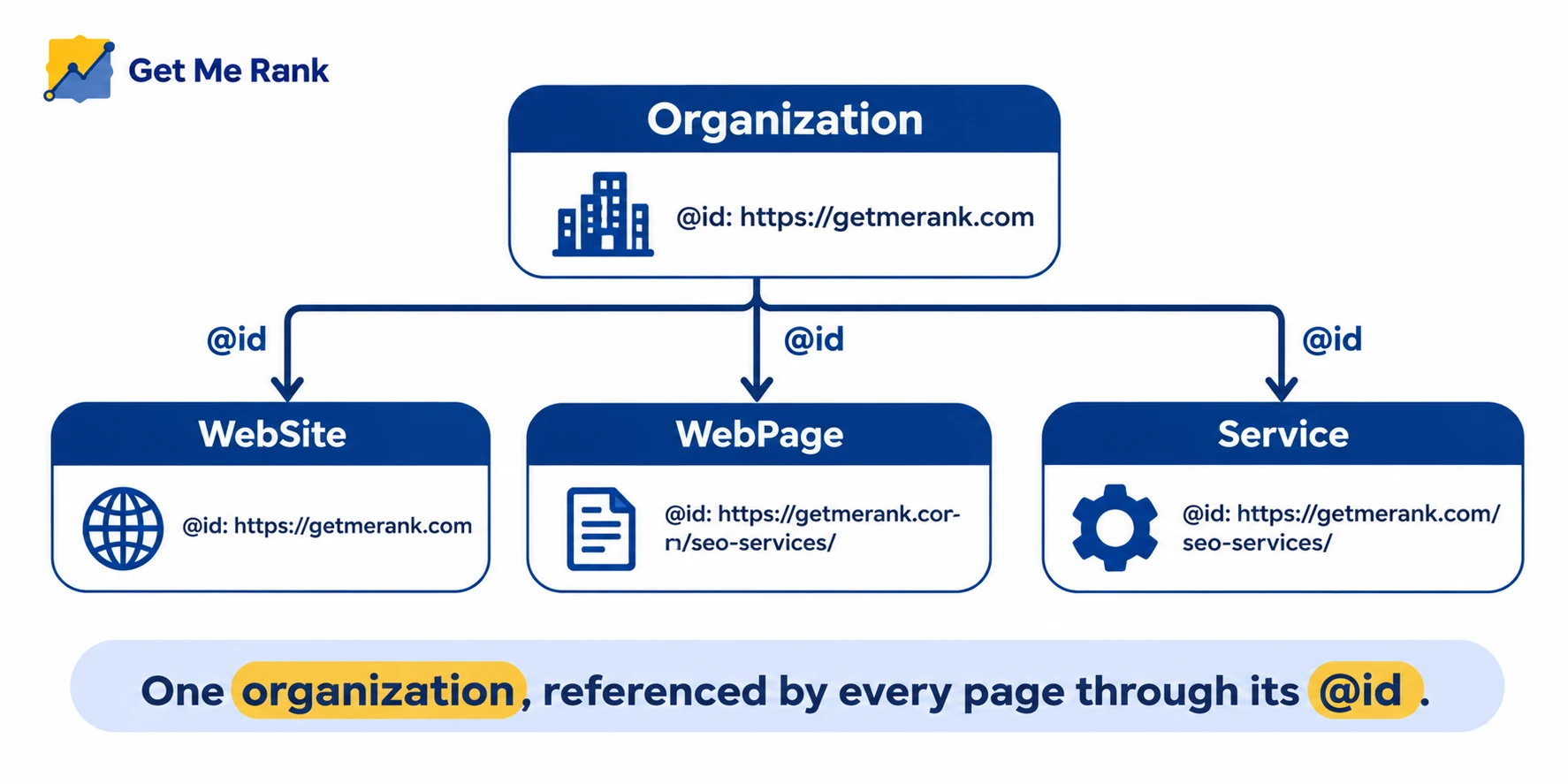
Link Schema Types Together With @id
Give each entity an @id, which works like a name tag, and refer to it from other entities instead of repeating its details. In the examples above, the webpage points to the organization as its publisher through the same @id. The data stays consistent, and search engines can see that the pieces belong together. When you need several entities in one block, group them in an @graph.
Schema Implementation Checklist
Before publishing
- Pick the type that matches the main content of the page.
- Fill in every required property for that type.
- Confirm every value matches the visible text.
- Validate the code with the Schema Markup Validator and the Rich Results Test.
After publishing
- Inspect the live URL in Search Console.
- Watch the reports for new errors or warnings.
- Review the markup whenever prices, services, hours, or dates change.
Put a schema review on your SEO content calendar so these checks happen on a schedule, not only when something breaks.
How Do You Test and Validate Schema?
Use two tools before you publish and Search Console after.
Schema Markup Validator
The Schema Markup Validator at validator.schema.org checks your code against the Schema.org vocabulary. Paste in code or a live URL and fix whatever it flags. Google’s older Structured Data Testing Tool has been retired, so this is the tool to use.
Google’s Rich Results Test
This shows whether a page is eligible for Google’s rich results and flags missing required properties. Passing means eligible. It doesn’t mean a rich result will appear.
Monitor Errors and Click-Through Rate in Search Console
After publishing, check the enhancement and rich result reports for errors and warnings. Then compare impressions, clicks, and click-through rate on the marked-up pages over several weeks before and after the change, so you know whether the work paid off.
Balanced Take: Validation tools only confirm the code is well-formed. They can’t tell you whether the markup is the right choice for the page or whether it’s honest. That judgment still has to come from a person.
Does Schema Help With AI Search?
No special schema is needed for Google’s AI features. Google’s guidance says you don’t need extra markup, new machine-readable files, or AI-specific files to appear in AI Overviews or AI Mode.
What counts is the same groundwork as regular search:
- The page is crawlable, indexed, and eligible to appear with a snippet.
- The content is helpful, clear, and answers the question directly.
- Any structured data matches the visible text on the page.
Schema still earns its place. It gives machines a clear, consistent description of your business and pages, which supports understanding. It doesn’t guarantee a citation. For a fuller look at the topic, read our guide to Google AI Overviews optimization.
Did You Know? Google has steadily trimmed the rich results it shows. HowTo went in 2023, and FAQ followed in May 2026. The trend is toward fewer special listings, so build schema for clarity, not for a specific listing format.
Which Schema Types Matter Most?
Not every type deserves equal effort. Use this table to prioritize.
| Schema type | Best for | Effort | Rich result potential |
|---|---|---|---|
| Organization | Brand clarity | Low | Low, mostly indirect |
| WebPage | Page-level clarity | Low | None dedicated |
| Service | Service pages | Low to medium | None dedicated |
| LocalBusiness | Local businesses | Medium | Medium, in local features |
| Article or BlogPosting | Blog content | Low | Low to medium |
| Product with Offer | Ecommerce | Medium | High when eligible |
| Review or AggregateRating | Genuine product ratings | Medium | High when eligible, with strict rules |
Start with the low-effort foundations, then add the types that match your content and goals.
What Schema Mistakes Should You Avoid?
Most schema SEO problems come from shortcuts, not from the code itself.
Using the Wrong Schema Type
A mismatch between markup and page confuses search engines and wastes the work. Choose the type that describes the page’s main content, and check it against the Schema.org definition.
Marking Up Hidden or Inaccurate Content
Markup has to reflect what visitors can see. Fake reviews, hidden text, and made-up details break Google’s guidelines and can get your markup ignored or earn a manual action.
Leaving Markup Outdated
Prices, hours, services, and dates change. When the markup falls behind the page, trust drops with both users and search engines.
Copying Schema Without Editing It
Pasting someone else’s code, or an example with placeholders like example.com, is a frequent error. Replace every value with your own and validate before you publish.
How Does Get Me Rank Help With Schema and Technical SEO?
Get Me Rank treats schema as one part of technical SEO, not a one-off fix. We start by auditing the markup and site you already have, then plan which types belong on which pages. After that, we implement and test the markup, and track errors, impressions, and clicks in Search Console each month.
If you’d like that process handled for you, take a look at Get Me Rank’s SEO services.
FAQs
Is schema markup worth the effort for a small business website?
Usually, yes, if you keep it simple. Organization markup on the homepage, plus service or local business markup on the pages that matter, takes little time and gives search engines a clean description of who you are. Skip the exotic types until the basics are in place.
Can one page have more than one schema type?
Yes. A blog post can carry Article, Person, and BreadcrumbList markup together. Keep the types consistent with the page’s main content, and connect them with @id so they read as one picture rather than separate fragments.
Do Bing and other search engines use schema too?
Yes. Schema.org is a shared vocabulary, so other search engines and tools can read it. What each one does with the markup differs, and rich result support isn’t the same everywhere.
What’s the difference between a warning and an error in the testing tools?
An error means a required property is missing or wrong, which can make a page ineligible for a rich result. A warning points to a recommended property you left out. Fix errors first. Add warnings when the information genuinely exists on your page.
How should a multi-location business handle local business schema?
Give each location its own page and its own markup, using that location’s address, phone number, and hours. Don’t stack every branch onto the homepage. Each location’s details should match its own Business Profile.
Can Get Me Rank audit the schema on my existing site?
Yes. An audit is where we start: we review your current markup, flag duplicates and mismatches, and recommend which types fit each page before anything is changed. Our SEO services page has more on how that fits into wider technical work.
Conclusion
If you started by asking what is schema in SEO, the short version is that it’s a standard way to describe your pages to search engines. Good schema SEO won’t rank a weak page, but it gives a strong page the best chance of being understood and shown clearly. Start with organization, webpage, and service markup, add the types that match your content, validate every change, and keep it current. Track the results in Search Console, and be patient with the timing.