Content Creation

Short Answer
AnswerThePublic is a free-to-try research tool that shows the questions, comparisons, and phrases people type into search engines and platforms about any topic. To use it, enter a short seed keyword, pick your country and platform, shortlist the questions a real buyer would ask, check demand in a keyword tool, then group them into pages, posts, ads and FAQs. Used well, one round of research feeds every channel you market on, not just your blog.
Key Takeaways
- AnswerThePublic shows how people actually phrase their questions, which is often different from how businesses describe themselves.
- Its data comes from autocomplete suggestions across Google, Bing, YouTube, TikTok, Instagram and Amazon, plus prompts people ask AI tools.
- The tool tells you what people ask, not how often. Always check demand in a keyword tool before you commit to a topic.
- The question type tells you the format: “how to” wants a guide, “vs” wants a comparison, “can I” wants a straight yes or no.
- The same question list can shape your blog, social posts, video hooks, ad copy, product listings and local pages.
- The free version is enough to test it. Pay only if you’ll run searches every week.
What Is AnswerThePublic and Where Does Its Data Come From?
AnswerThePublic is a search listening tool. You type in a topic, and it pulls together the suggestions people see when they start typing that topic into a search box, then sorts them into questions, comparisons and phrases. It’s now owned by Neil Patel’s company and has grown well beyond its original Google-only wheel.
The data comes from autocomplete. When thousands of people type “protein powder for”, the search engine learns to suggest the most common endings. The answer the public tool collects those suggestions from Google and Bing, from YouTube, TikTok and Instagram, and from Amazon for shopping searches. Newer versions also show questions people put to AI assistants like ChatGPT and Gemini.
That’s why it works so well for audience research. You aren’t guessing what customers want to know. You’re reading what they’ve already typed.
How the Results Are Grouped
Every search comes back in the same set of groups. Once you know what each one is for, the results stop looking like a wall of text.
How to Use AnswerThePublic to Find What Your Audience Is Really Asking
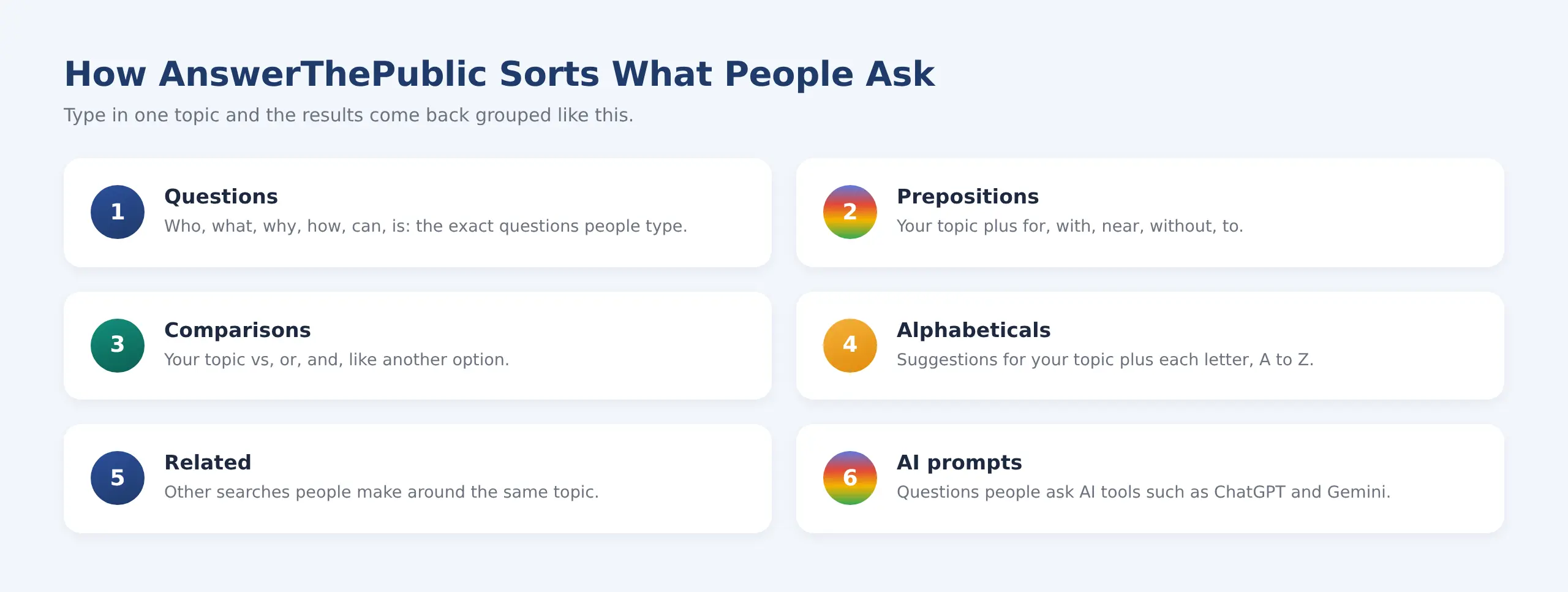
Questions and comparisons are usually the most useful groups for planning content.
DID YOU KNOW
Google has said for years that around 15% of the searches it sees every day are brand new. Keyword tools that rely on historical volume often miss these. Autocomplete-based tools pick them up much sooner.
Why Audience Questions Matter More Than Keywords Alone
A keyword tells you what someone searched. A question tells you why. “Running shoes” could mean anything. “Are running shoes good for walking all day?” tells you exactly who is asking, what they’re worried about, and what answer would win them over.
This matters more every year. Search engines are better at understanding intent, and AI answers pull the clearest reply to a specific question rather than the page that repeats a keyword most often. Content built around real questions tends to match both. It also reads better, because you’re answering a person, not filling a quota.
There’s a commercial side too. The questions people ask right before they buy, like “is X worth it”, “X vs Y” or “X price in India”, are the ones that turn readers into enquiries. Most businesses never write for them because they never see them. AnswerThePublic puts them in front of you.
How to Use AnswerThePublic, Step by Step
Here’s how to use AnswerThePublic so you end up with a usable shortlist rather than a screenshot of a pretty wheel. The whole process takes about thirty minutes for one topic.
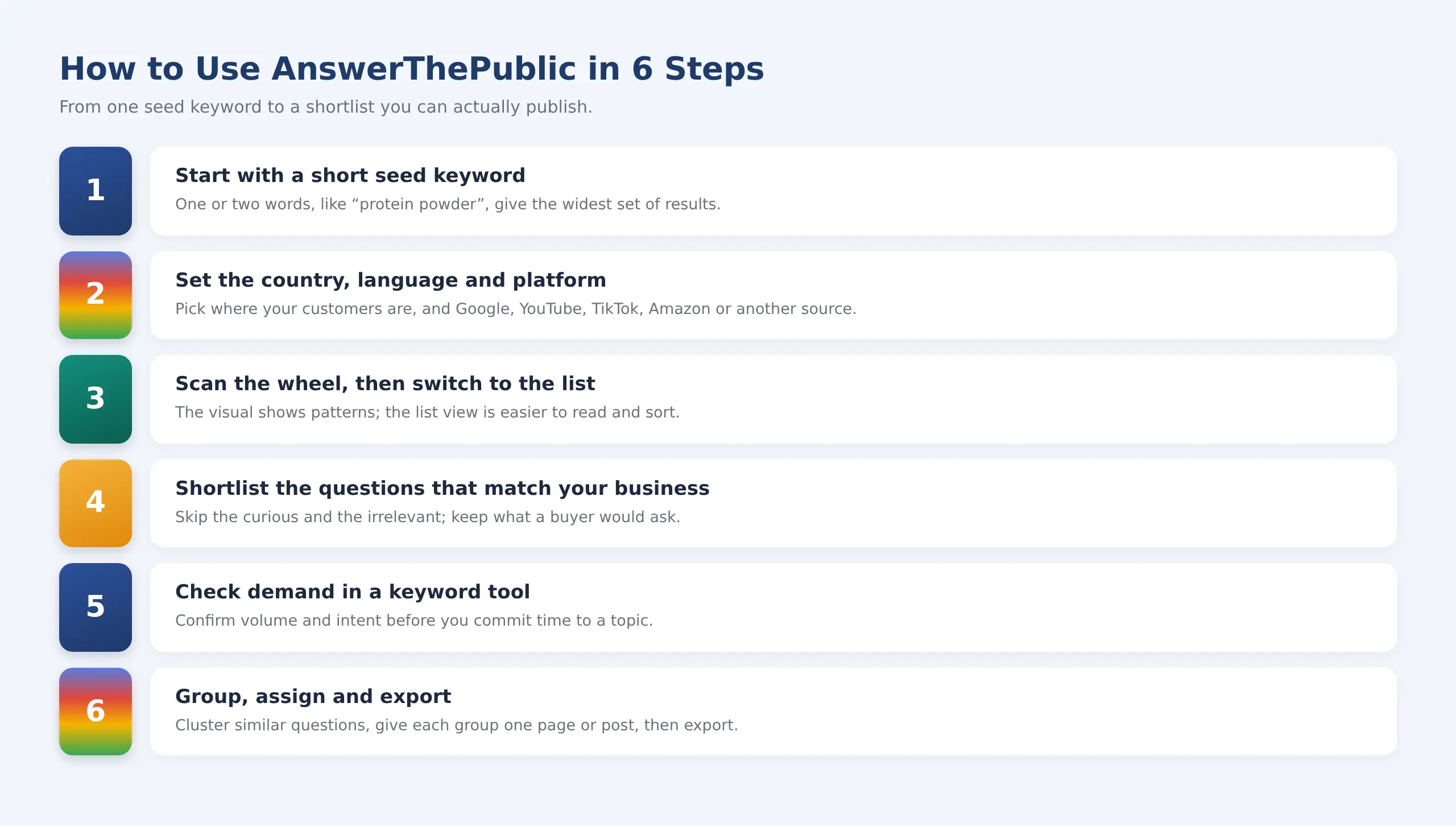
The tool does steps one to three. Steps four to six are where the value comes from.
1. Start With a Short Seed Keyword
Use one or two words, like “home loan” or “protein powder”. Long phrases return fewer suggestions, because there are fewer ways to finish them. You can always narrow down later.
2. Set the Country, Language, and Platform
Pick the country where your customers are. An Indian audience asks different questions from a US one, even in English. Then choose the platform: Google for search, YouTube or TikTok for video ideas, Amazon if you sell products.
3. Scan the Wheel, Then Switch to the List
The visual wheel is good for spotting patterns, such as a cluster of “why” questions that signals confusion. For actual work, switch to the list or data view. It’s easier to read, sort, and copy.
4. Shortlist the Questions That Match Your Business
Most results won’t be useful, and that’s fine. Keep the questions a potential customer would ask. Skip the ones driven by curiosity, students, or job seekers, unless that’s who you serve.
PRO TIP
Run the same seed keyword on Google and then on YouTube or Instagram. The overlap shows what people want to read about. The questions that only appear on video platforms are the ones people want to see demonstrated.
5. Check Demand in a Keyword Tool
This is the step most people skip. The tool shows that a question exists, not how many people ask it. Run your shortlist through a keyword tool to check volume, difficulty, and intent. Our guide on how to do keyword research covers that part in detail.
6. Group, Assign and Export
Cluster questions that share an answer. “Is a home loan tax deductible” and “home loan tax benefit” belong on the same page. Give each cluster one page or post so you aren’t competing with yourself, then export the list into your content calendar.
GETMERANK TIP
Keep one sheet with three columns: the question, the page that answers it, and the channel it feeds (blog, social, ad, or listing). When a new question turns up, you’ll know at a glance whether it needs new content or just a line added to an existing page.
How Do You Turn the Questions Into Content?
Let the shape of the question decide the format. Someone asking “how to” wants steps. Someone asking “vs” wants a side-by-side. Get the format wrong, and even a perfectly targeted page will struggle, because it doesn’t give people what they came for.
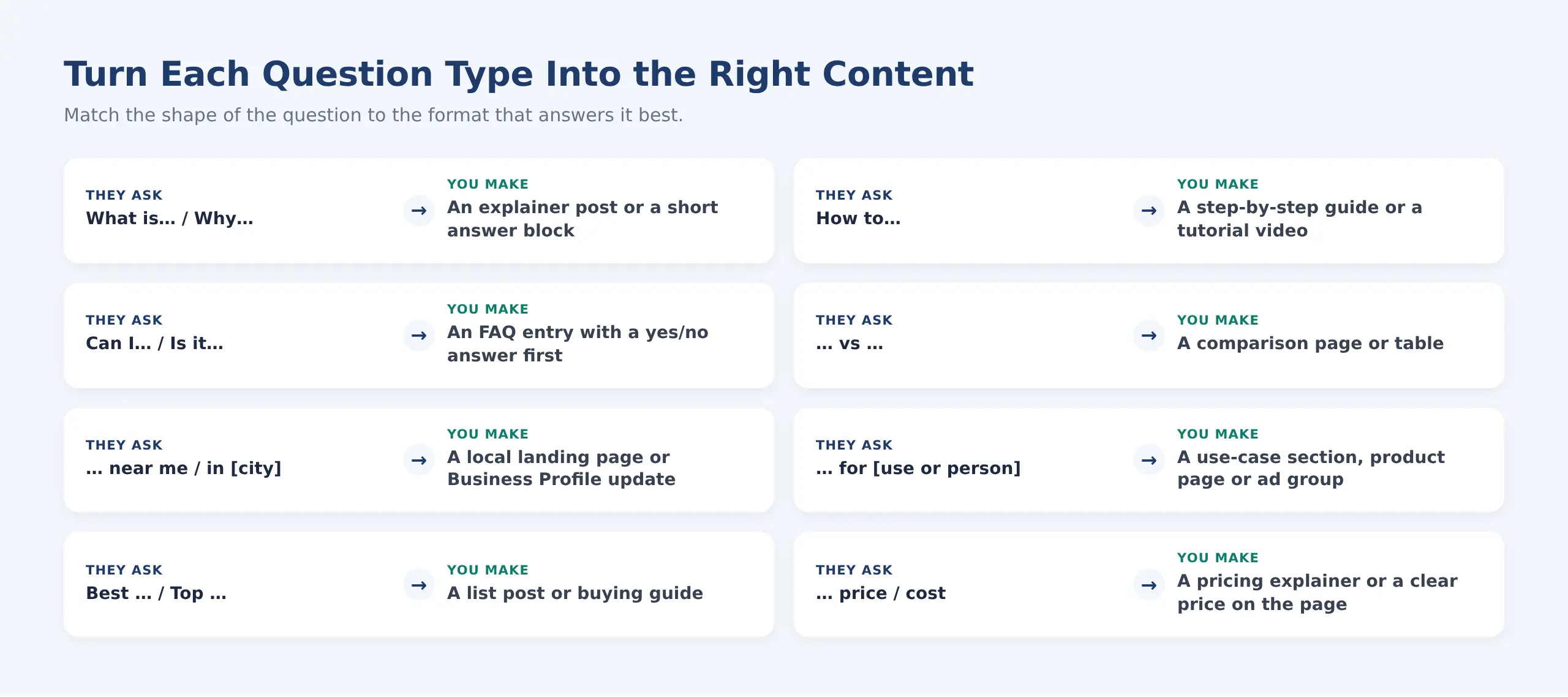
The wording of the question usually tells you the best format.
Two habits make this work. First, answer the question in the first sentence or two, then expand. Readers skim, and search engines quote. Second, use the question’s own wording in your heading where it reads naturally. If people ask “is it safe to”, your heading should too.
Using AnswerThePublic Beyond SEO: Every Channel You Market On
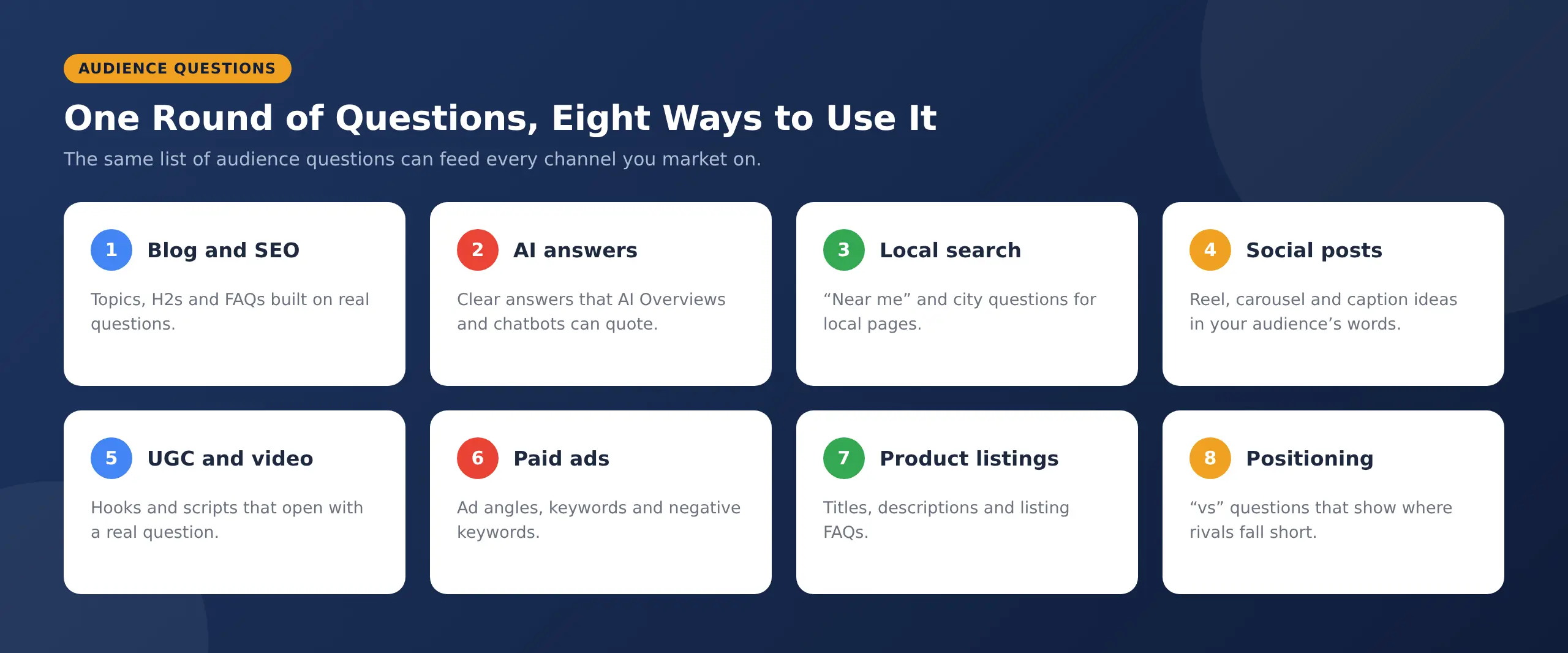
Most guides treat it as a blog-topic generator. That leaves most of its value unused. The questions your audience asks are the same whether they’re on Google, scrolling Instagram, or comparing products on Amazon. One round of research can shape all of it.
One question list, used across every channel, keeps your messaging consistent.
Blog and SEO Content
This is the obvious use, and still a strong one. Using Answer the Public for SEO gives you topics with built-in demand, H2s phrased the way people search, and FAQ sections that answer real follow-up questions. It’s also a quick way to find gaps in posts you’ve already published.
AI Answers: Overviews, ChatGPT and Gemini
AI answers are built from content that responds to a specific question clearly and directly. Question research tells you which questions to answer, and the “AI prompts” group shows what people are asking assistants directly. Write a short, direct answer under each question heading, and you give AI tools something clean to quote. Our guide to Google AI Overviews optimization goes deeper on how that works.
DID YOU KNOW
Google’s AI Overviews reach more than 2 billion people every month. The pages they cite tend to answer the exact question in plain language near the top of a section.
Local Search
Try your service plus “near me”, or your service plus your city. You’ll see what local customers worry about: opening hours, prices, parking, emergency availability. Those answers belong on your local landing pages and your Google Business Profile. If local visibility is new to you, start with what local SEO is and how it works.
Social Media Posts
Every good question is a post waiting to happen. A “how to” becomes a carousel, a “why” becomes a short Reel, and a “vs” becomes a poll. Because the questions are in your audience’s own words, captions built on them feel natural. Social platforms are search engines now too, which our social media SEO guide explains.
UGC and Video Scripts
The first two seconds of a video decide whether people keep watching. Opening with a question your audience actually asks (“Is this serum safe for oily skin?”) is one of the most reliable hooks there is. Hand creators a list of real questions and their UGC videos will sound like answers, not ads.
Paid Ads
Question research sharpens ads in three ways. It gives you angles for headlines, it surfaces long-tail keywords that are often cheaper, and it shows you what to exclude. If people keep searching “free” or “jobs” alongside your service, those belong on your negative keyword list. A performance marketing team will use these patterns to stop budget leaking on clicks that will never convert.
PRO TIP
Run a Comparisons search on your own brand name or product category. The “vs” and “or” results show exactly which competitors people weigh you against. That’s useful for ad copy and for deciding which comparison pages to build.
Product Listings and Marketplaces
Switch the platform to Amazon, and you’ll see how shoppers search: by size, use, material, age group or problem. Work those phrases into product titles, bullet points, and listing FAQs. The questions buyers ask before purchase are often the same ones that end up as returns when the listing doesn’t answer them.
Positioning Against Competitors
Comparison questions are a cheap way to understand your market. If people keep asking whether a competitor is “worth it” or “safe”, you’ve found the doubt you can address in your own messaging. If they compare you with a cheaper option, you know which value point to make clear.
Is AnswerThePublic Free?
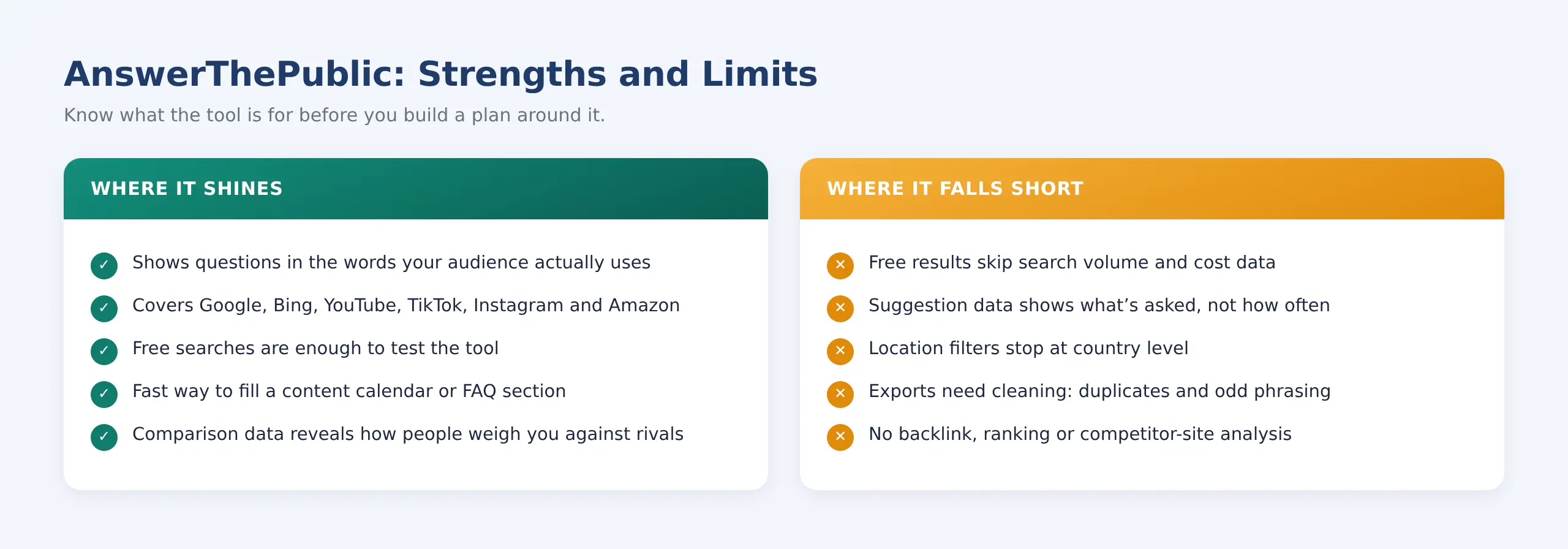
Partly. AnswerThePublic offers a small number of free searches each day, which is enough to try it and handle the occasional topic. The free results leave out search volume and cost-per-click data, and exports are limited.
Paid plans start at around $20 a month, with lower rates on yearly billing. Higher tiers add more searches, more projects, and AI content features. Plans and limits change often, so check the pricing page before you buy.
HIGHLIGHT
Balanced take: the newer plans include AI article writing. It can speed up a first draft, but publishing it unedited is risky. Generic AI text rarely adds the first-hand experience and specific detail that search engines and readers look for. Use the questions; write the answers yourself, or edit heavily.
What AnswerThePublic Does Well, and Where It Falls Short
The AnswerThePublic tool is excellent at one job: showing how people phrase what they want to know. It isn’t a full SEO suite, and treating it like one leads to bad decisions.
Use it for discovery, then confirm demand and competition with other tools.
The biggest trap is treating every suggestion as worth a page. Autocomplete shows what has been typed often enough to be suggested. It doesn’t tell you whether those searchers will buy, or whether you can realistically rank.
AnswerThePublic Alternatives Worth Knowing
If you’re looking at AnswerThePublic alternatives, the right one depends on what you need: more questions, better volume data, or a full suite.
| Tool | Best for | Cost |
|---|---|---|
| Google itself (autocomplete, People Also Ask) | Quick manual checks on a single topic | Free |
| AlsoAsked | Mapping how “People Also Ask” questions branch out | Free tier, then paid |
| Semrush / Ahrefs | Question keywords with volume, difficulty, and full SEO data | Paid |
| Ubersuggest | Budget keyword data from the same company | Free tier, then paid |
| Reddit and Quora | Long, detailed questions and real objections | Free |
Most teams use two together: one for discovering questions and one for checking demand.
Common Mistakes People Make With Audience Question Research
- Writing one post per question: Ten near-identical questions need one strong page, not ten thin ones that compete with each other.
- Skipping the demand check: A question can appear in autocomplete and still have almost no searches.
- Ignoring the country setting: Questions from another market can send your content in the wrong direction.
- Only using it for the blog: The same research could be shaping your ads, social posts and listings.
- Running it once: Questions change with seasons, prices, and news. Repeat your main topics every quarter.
PRO TIP
Save your seed keywords and rerun them every three months. Questions that are new since your last check are often early signs of a trend, and new questions usually have less competition.
How GetMeRank Turns Audience Questions Into Growth
Finding the questions is the easy part. The hard part is deciding which ones matter, turning them into the right content for each channel, and checking whether it worked. That’s the part most busy teams never get round to.
At GetMeRank, audience question research feeds everything we do for a client. It shapes the SEO content plan and the answers we write for AI search. It guides social posts and UGC scripts, ad angles and negative keywords, and the product listings we optimise through our ecommerce SEO practices. Because every channel starts from the same list of real questions, your messaging stays consistent wherever customers find you.
READY TO GROW?
Want to know what your customers are really asking? Book a free strategy call, and we’ll show you the questions your audience asks and how to turn them into traffic, leads, and sales.
FAQs
1. Is AnswerThePublic accurate?
It accurately shows suggestions that search engines and platforms display, because that’s where the data comes from. What it doesn’t show is how often each question is asked. Treat it as a list of real phrasings, then check the important ones for volume in a keyword tool.
2. Do I need to sign up to use AnswerThePublic?
You can try a few searches without paying. Saving projects, seeing search volume and exporting larger lists require an account and, for most of it, a paid plan.
3. Can AnswerThePublic show questions for Indian or regional-language audiences?
Yes. You can set the country and language before you search. Results for smaller languages can be thinner, so test a few variations of your keyword, including the English and local-script versions.
4. How often should I repeat audience question research?
For your core topics, once a quarter is a good rhythm. Run extra searches before planning a campaign, launching a product, or entering a new market, since that’s when new questions matter most.
5. Can AnswerThePublic help with YouTube and Instagram content?
Yes. Switch the platform setting to YouTube, TikTok or Instagram and you’ll see what people search for inside those apps. Those questions make strong video hooks, carousel topics and caption openers.
6. Can GetMeRank do audience question research for my business?
Yes. We research the questions your customers ask across search, social and marketplaces, then turn them into a plan covering content, ads, social and listings. Book a free strategy call and we’ll walk you through what we find for your category.
Final Thoughts
AnswerThePublic won’t write your strategy for you, but it removes the biggest guess in marketing: what your audience actually wants to know. Start with one topic, shortlist the questions a real buyer would ask, check the demand, and answer them clearly wherever those customers spend their time. Do that every quarter and your content, ads and listings will keep speaking the same language as the people you’re trying to reach.