
Digital Strategy
Short Answer
To drop a pin on Google Maps, touch and hold any spot on the map in the app (Android or iPhone), or click once on the map on a computer. A red marker called a dropped pin appears, with a card showing its address or coordinates. From that card you can share the pin, save it, label it, or get directions. Businesses use the same idea to set the exact spot where their shop appears on Google Maps.
Key Takeaways
- Phone: touch and hold the map. Computer: click once on an empty part of the map. That’s how to drop a pin on Google Maps.
- A dropped pin marks an exact spot, which is useful in Indian neighbourhoods where addresses are vague.
- Every pin comes with coordinates and a Plus Code, which you can share even when there’s no street address.
- On WhatsApp, “current location” sends one fixed spot, while “live location” keeps updating for up to 8 hours.
- Businesses should set their pin on the entrance customers actually use, not just the building.
- A wrong business pin quietly costs calls and visits. Fix it in your Business Profile under Location.
What Is a Dropped Pin?
A dropped pin is a marker you place on a map yourself, instead of searching for a named place. It points to one exact spot: a building gate, a parking area, a plot of land, the corner where you want a friend to meet you. If someone sends you a message that just says “Dropped pin”, that’s what it is: a spot they marked by hand.
This matters more in India than in many countries. Plenty of homes, shops, and offices have addresses like “near the temple, behind the petrol pump”. A pin removes the guesswork. The delivery rider, the cab driver, or the new customer sees the exact spot, not a rough area.
DID YOU KNOW
“Drop a pin” and “dropped pin” are each searched around 823,000 times a month in India. Many of those searches come from people who got a pin on WhatsApp and wanted to know what it means.
How to Drop a Pin on Google Maps
Here’s how to drop a pin on Google Maps on each device. The idea is the same everywhere: press and hold on a phone, click on a computer. If you’ve ever wondered how to pin location on Google Maps when the place has no name, this is it.
How to Drop a Pin on Google Maps: Share, Save and Fix a Dropped Pin (Phone, PC and Business)
On Android
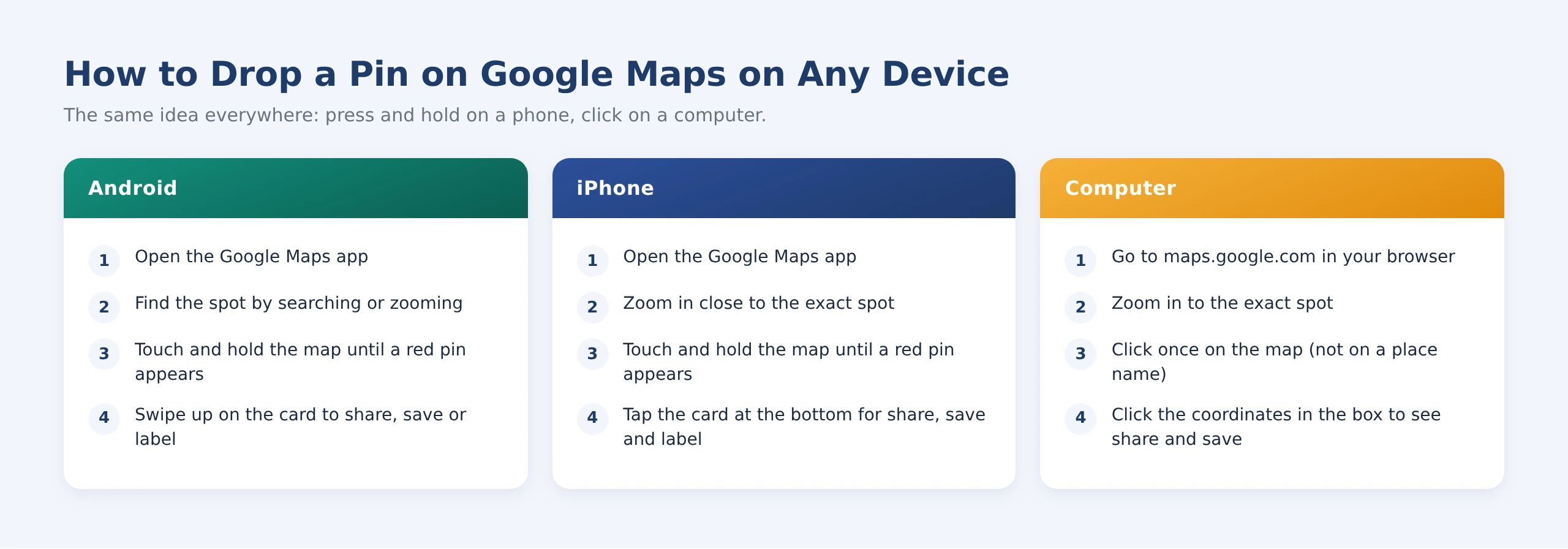
Open the Google Maps app and move the map to the spot you want, by searching a nearby landmark or zooming in. Then touch and hold the exact point until a red pin appears. A card slides up from the bottom with the address (if there is one) and the coordinates. Swipe up on the card to see Share, Save and Label.
On iPhone
How to drop a pin on iPhone is almost identical. Open the Google Maps app, zoom in close, and touch and hold the map until the red pin appears. Tap the card at the bottom to open the full set of options. If you use Apple Maps instead, the steps are slightly different. They’re covered further down.
On a Computer
Here’s how to drop pin in Google Maps on a laptop or desktop. Open maps.google.com and zoom in to the spot. Click once on an empty part of the map, not on a shop name or icon. A small box appears at the bottom with the coordinates. Click it to open the full panel with directions, save and share.
PRO TIP
Switch to satellite view before you drop a pin on a building with several entrances, a big campus or a plot of land. The map view shows roads; the satellite view shows the actual gate.
What Can You Do With a Dropped Pin?
Once a dropped pin is on the map, the card gives you several options. Most people only use Share, but the others are just as handy.
Share It
Tap Share on the pin’s card to send it by WhatsApp, SMS, email or any app on your phone. The other person gets a Google Maps link that opens on the exact spot. This is the simplest answer to how to share location on Google Maps when the place has no proper address, and the pin location Google Maps sends is exact to a few metres.
Save It and Give It a Label
Tap Save to add the pin to one of your lists, such as Favourites or Want to go. This is also how to save a location on Google Maps for site visits or a trip. Tap Label to give it a private name, like “Warehouse gate 2”, so you can search for it later just by typing that name.
Measure Distance
Here’s how to measure distance on Google Maps. On a phone, drop a pin, open its card and choose Measure distance, then move the map to a second point. On a computer, right-click the starting spot, choose Measure distance and click the next point. It shows straight-line distance, which is useful for checking delivery radius or plot size.
How to Send a Dropped Pin on WhatsApp
In India, sending a pin usually means WhatsApp. There are two ways to do it, depending on where the location is.
Send a Google Maps Pin to WhatsApp
If the spot isn’t where you’re standing, drop the pin in Google Maps first, tap Share and choose WhatsApp. The other person gets a link that opens the exact pin. This is the best option for sending a shop, a venue or a meeting point in advance.
Send Your Current or Live Location From WhatsApp
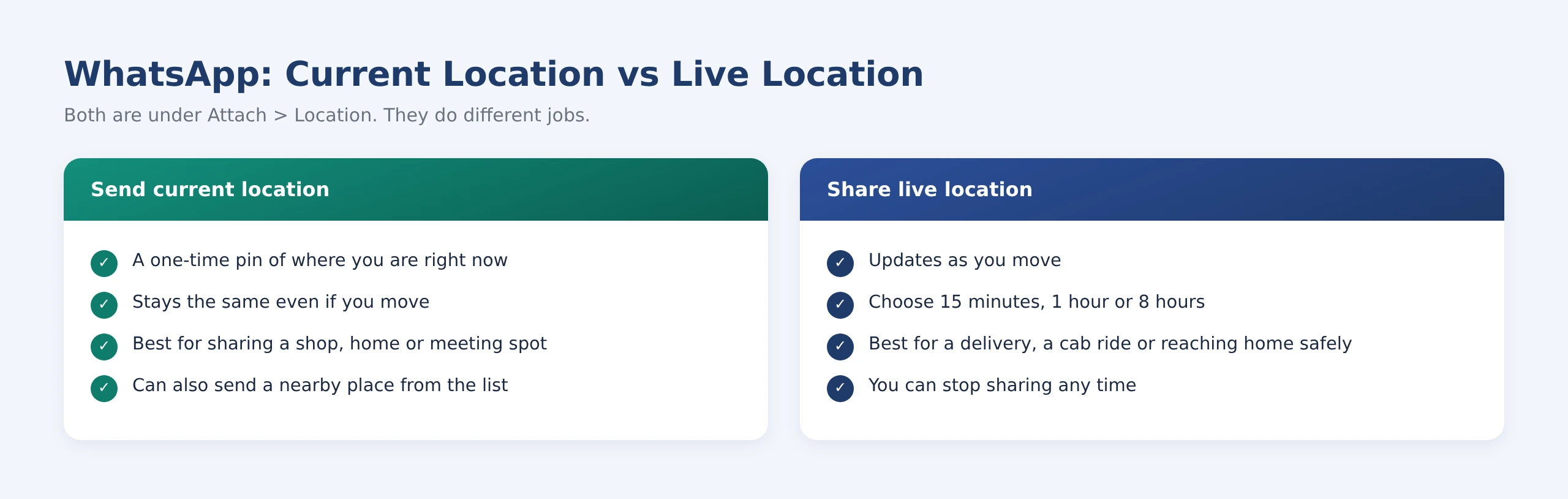
If you’re already at the spot, it’s quicker to do it from WhatsApp itself. Here’s how to share location on WhatsApp: open the chat, tap the attach icon, choose Location, then pick Send your current location. To follow someone’s journey instead, this is how to send live location on WhatsApp: choose Share live location and set how long it should run.
PRO TIP
Before you send your current location, check the accuracy circle around the blue dot. Indoors, it can be off by a whole street. If it looks wide, step outside for a few seconds or drop a pin by hand instead.
How to Get Coordinates From Google Maps
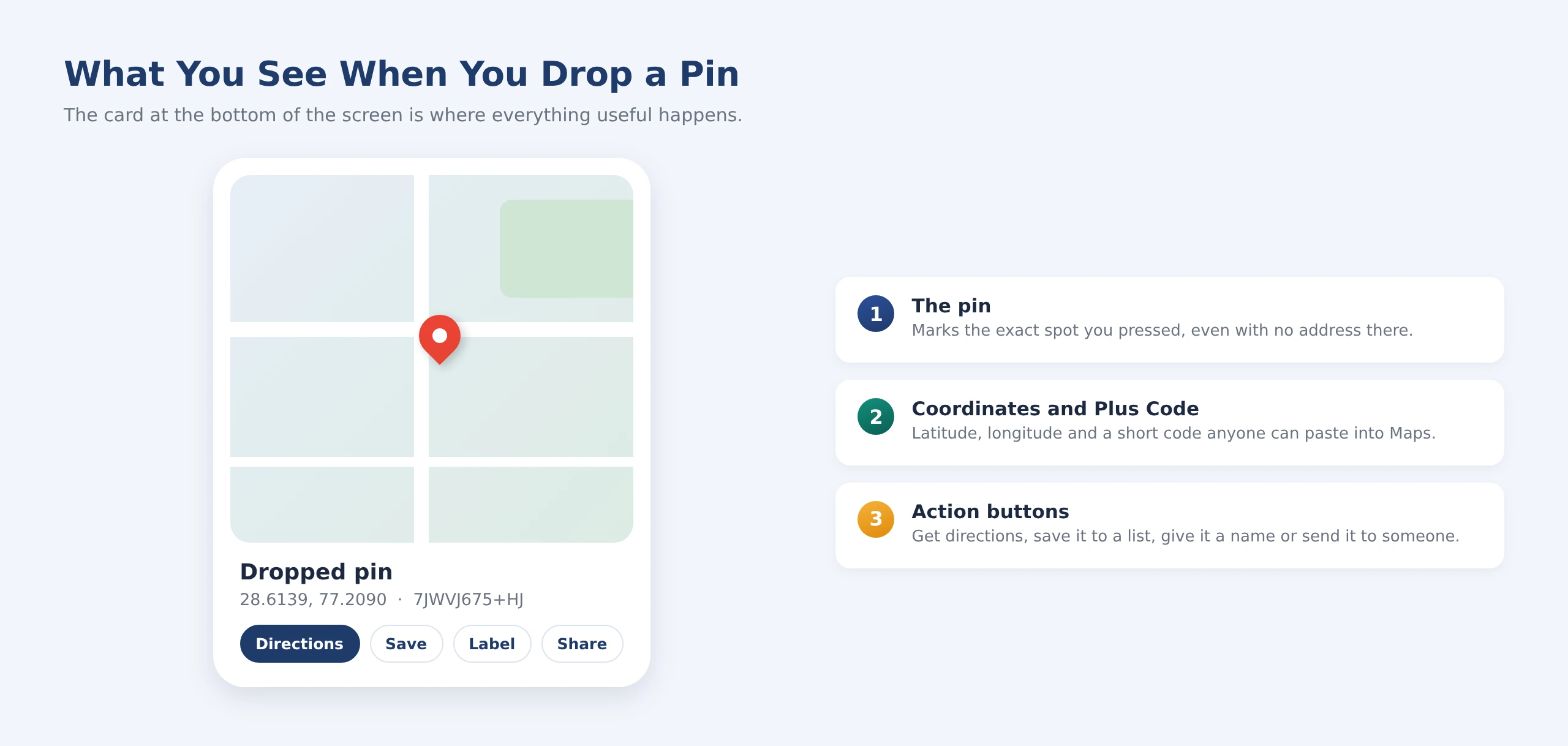
Every dropped pin has coordinates: two numbers for latitude and longitude, like 28.6139, 77.2090. Latitude comes first and tells you how far north or south the spot is. Longitude comes second and tells you how far east or west.
Here’s how to get coordinates from Google Maps. On a phone, drop a pin and look at the card or the search bar at the top, then tap the numbers to copy them. On a computer, right-click any spot and click the coordinates at the top of the menu to copy them. Google Maps coordinates work in any map app, GPS device or drone app, which makes latitude and longitude on Google Maps the most universal way to describe a spot.
Plus Codes and DIGIPIN: Addresses for Places Without a House Number
Coordinates are exact but long. Google’s Plus Code turns the same spot into a short code like “7JWVJ675+HJ”, which you’ll see on every pin’s card. Paste it into Google Maps search and it opens the same spot.
India Post has also introduced DIGIPIN, a 10-character code for a grid square of about 4 by 4 metres. It doesn’t replace your six-digit PIN code. It sits alongside it as a more precise digital address. You can generate yours from India Post’s Know Your DIGIPIN tool.
DID YOU KNOW
A standard Plus Code points to an area of roughly 14 by 14 metres, small enough to tell apart two shops next to each other in most markets.
How to Drop a Pin on Apple Maps
If you use Apple Maps on an iPhone, here’s how to drop a pin on Apple Maps. Touch and hold the spot on the map until a pin appears, then swipe up on the card to share it, add it to a guide or get directions. On a Mac, right-click the spot (or Control-click) and choose Drop Pin. Pins from Apple Maps open in Apple Maps for iPhone users, and as a web link for everyone else.
How to Remove a Dropped Pin
A dropped pin that you haven’t saved disappears on its own. On a phone, tap the X on the card or tap anywhere else on the map. On a computer, close the panel or click elsewhere.
If you saved or labelled it, here’s how to remove pin from Google Maps for good. Open the You or Saved tab, find the list or label, tap the three-dot menu next to the place and choose Remove. Labels can be edited or deleted the same way.
How to Add a Missing Place on Google Maps
Sometimes the place you’re pinning isn’t on Maps at all: a new shop, a building, a small business. Here’s how to add a missing place on Google Maps. In the app, tap Contribute, then Add place. On a computer, right-click the spot and choose Add a missing place. Fill in the name, category and location, then submit it for review.
This is also the simplest answer to how to add location in Google Maps for a place you don’t own. If it’s your own business, though, don’t stop here. Use the business steps below so you can manage the listing yourself.
For Businesses: How to Put Your Business on Google Maps
For a business, the pin isn’t a convenience. It decides whether customers reach your door or end up calling to ask where you are. Here’s how to add my business to Google Maps, in the order that avoids the most common problems.
The address step is where most small businesses get stuck. Learning how to add a business location on Google Maps often comes down to one fact: if Google can’t find your address, which happens a lot with Indian addresses, you can set the pin by hand on the map. That’s also how to add shop location in Google Maps for a shop inside a market or a lane with no street number.
GETMERANK TIP
Put the pin on the entrance customers actually walk through, not the middle of the building. For a shop inside a mall or market, pin the nearest gate. For an office in a large complex, pin the right tower. It saves your customers a phone call, and saves your staff from giving directions all day.
Why the Exact Pin Matters for Your Business
Google ranks local businesses on three things: how relevant they are, how far they are from the person searching, and how well known they are. Your pin feeds the distance part directly. A pin in the wrong place can push you down the map for the very street you’re on, and send people who do find you to the wrong spot.
It also affects trust. A customer who reaches a locked back gate or the wrong building rarely tries again, and often leaves a review about it. If you’re new to how Google decides who shows up on the map, our guide to what local SEO is explains it in plain terms.
How to Change Business Location on Google Maps
If your pin is off, or you’ve moved, here’s how to change business location on Google Maps. Open your Business Profile, choose Edit profile, then Location. Next to Business location, select Edit, then Adjust, move the map so the pin sits on your entrance, and save.
The same place is where you go to learn how to update address on Google Maps after a move. Changes often show within minutes, but some take longer to review, and a new address may ask you to verify again. Here are the most common pin problems and what to do about each.
HIGHLIGHT
Balanced take: moving your pin to a busier street or closer to the city centre won’t help you rank, and it can get your profile suspended. Google expects the pin to show where customers can actually find you. Fix it to be accurate, not to look closer.
Service-Area Businesses
If you go to your customers, like a plumber, a pest control service or a home tutor, and don’t serve them at your address, you don’t need a public pin. Set a service area (the cities or areas you cover) and hide your address. Only do this if customers genuinely don’t visit you, because hiding the address of a shop that people walk into works against you.
Common Dropped Pin Mistakes
Most pin problems come from rushing. These are the ones we see most often.
- Dropping the pin while zoomed out. One tap at city level can land a few hundred metres away. Zoom right in first.
- Sending current location from indoors. GPS drifts inside buildings. Drop a pin by hand when accuracy matters.
- Pinning the building, not the door. Customers and riders need the entrance, especially in big complexes.
- Creating a second business listing. Search first. Duplicates split your reviews and confuse Google.
- Leaving an old pin after moving. Update the address and pin the day you move, not when customers complain.
How GetMeRank Helps Businesses Get Found on Google Maps
Getting the pin right is step one. Getting found when someone nearby searches for what you sell takes more: the right categories, a complete profile, steady reviews, consistent details across the web and a website that backs it all up.
At GetMeRank, we set up and manage Google Business Profiles for local businesses across India. That includes fixing pins and addresses that Google can’t read, cleaning up duplicate listings, and handling verification. If you want to see the full list of what matters, our local SEO checklist covers it step by step. If you’d rather have it done for you, our local SEO services team can take it from here.
READY TO GROW?
Is your business easy to find on Google Maps? Book a free strategy call and we’ll check your pin, your profile and how you show up for searches near you.
FAQs
What does “dropped pin” mean in a message?
It means the sender marked an exact spot on a map and shared it with you. Tap it and it opens in your maps app on that spot, ready for directions.
How do I drop a pin at my current location?
Tap the blue dot that shows where you are, or touch and hold right on it. You can also share your current location straight from WhatsApp. If you’re indoors, check the accuracy first, as it can be off by a few metres or more.
Can I drop a pin on Google Maps without internet?
Only on maps you’ve downloaded for offline use, and some options like sharing will wait until you’re back online. For remote sites, download the area in advance.
Can I drop more than one pin at a time on Google Maps?
Not as temporary pins. Each new one replaces the last. To keep several spots, save or label each pin, or create a list. For larger projects, Google My Maps lets you plot many points on one custom map.
Does the person I send a pin to need Google Maps?
No. The link opens in a browser if the app isn’t installed. Coordinates also work in any other map or GPS app.
Why does my business show in the wrong place on Google Maps?
Usually because Google couldn’t match the address exactly, so it guessed. Fix it by adjusting the pin under Edit profile > Location in your Business Profile. If someone else’s listing is wrong, use Suggest an edit in Maps.
Can GetMeRank fix a wrong pin or duplicate listing for my business?
Yes. We review your Business Profile, correct the pin and address, request removal of duplicates where they exist, and help with re-verification if Google asks for it. Book a free call and we’ll take a look.
Final Thoughts
Learning how to drop a pin on Google Maps takes a minute, but it solves a very Indian problem: addresses that only make sense to people who already know the way. Use pins to share spots that have no proper address, save the places you visit often, and send coordinates or a Plus Code when someone needs precision. If you run a business, spend five minutes today checking that your own pin sits on your front door. It’s one of the simplest fixes that brings more customers to the right place.