
SEO
Key Takeaways
- A checklist turns a vague goal (“rank higher locally”) into specific, checkable tasks
- Your Google Business Profile comes first, because it drives most of what appears in the map pack
- Your name, address, and phone number need to match everywhere they appear online
- Reviews matter twice: they influence how prominent you look, and they influence whether people choose you
- Location pages need genuinely unique content, not the same text with a different town name
- The checklist changes depending on whether you have one location, serve customers at their homes, or run several branches
- Local SEO is a monthly habit, so a short routine you keep beats a big audit you never repeat
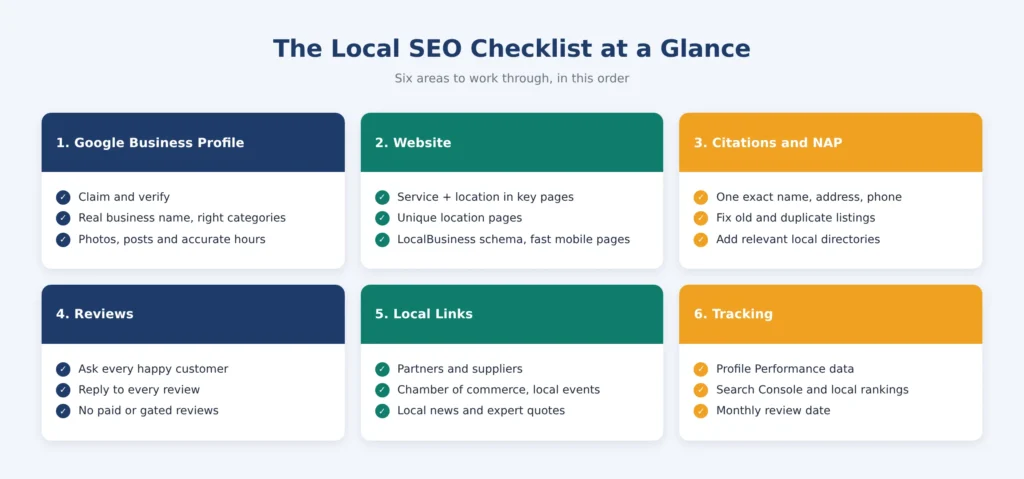
A local SEO checklist is a step-by-step list of the things that decide whether nearby customers can find and choose your business in local search. You use it by working through six areas in order: your Google Business Profile, your website, your citations, your reviews, your local links, and your tracking. Fix the biggest gaps first, usually an incomplete profile or inconsistent business details, then review the list every month.
DID YOU KNOW
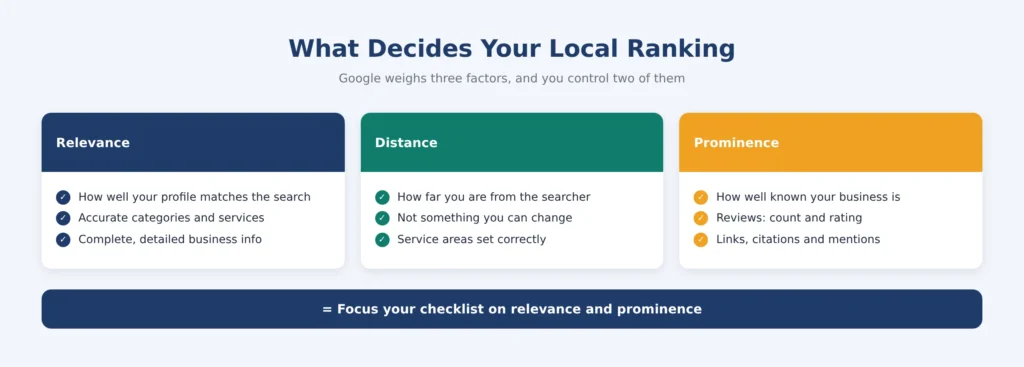
Google says local results depend on three things: relevance, distance, and prominence. You can’t change how far you are from a searcher, so this checklist focuses on the two you can improve. Google also says businesses with complete and accurate info are more likely to show up in local results.
What Is a Local SEO Checklist?
A local SEO checklist is a working document that lists every task needed to make a business visible in local searches, grouped by area and ordered by priority. It’s closer to a pre-flight check than a strategy document. You don’t debate what to do; you confirm it’s done.
Local SEO for businesses is about appearing when someone nearby searches for what you offer, whether that’s “barber near me,” “emergency plumber,” or a service plus a city name. Search engine optimization for local business owners works differently from national SEO because Google treats these searches as local intent and uses a different set of signals, with a map pack of three listings often appearing above the regular results. A checklist keeps those signals from being forgotten, which is the usual reason local rankings stall.
Local SEO Checklist vs Local SEO Strategy: What’s the Difference?
The two get mixed up, but they do different jobs. A local SEO strategy decides which areas you target, which services you push, and how you sequence the work over months. A checklist is the repeatable list of tasks that carries out that plan and catches anything missed.
How Do You Use a Local SEO Checklist to Rank Higher in Local Search?
You need the checklist first, because a strategy built on an unverified profile or inconsistent listings has nothing solid under it. The strategy decisions then sit inside your wider SEO plan, and professional SEO services can help connect the two so local work supports your organic results too.
The Local SEO Checklist: What to Check and in What Order
Work through the six sections below in order. Each item is something you can tick off.
1. Google Business Profile Checklist
Your profile is usually the first thing a nearby customer sees, sometimes before your website, so it earns the most attention.
Claim, verify, and complete every field
- Claim or create your profile and finish verification, since an unverified listing won’t perform
- Use your real-world business name exactly as customers know it, without adding keywords or locations, which Google’s guidelines say can lead to suspension
- Set your address correctly, and if you travel to customers instead of receiving them, define your service areas and hide your street address
- Add your phone number and link to the most relevant page, which for a multi-location business means that location’s own page, not the homepage
Categories, services, and description
- Choose the primary category that best describes your main service
- Add secondary categories only where they genuinely apply, because they widen the searches you can appear for
- Write a clear description of what you do, who you serve, and where, in plain language and without keyword stuffing
- List your services and products in your own words
Photos, posts, and hours
- Upload real photos of your premises, team, and work, and refresh them regularly
- Keep hours accurate, including holidays and temporary changes
- Post updates about offers, events, or new services so the profile shows recent activity
PRO TIP
Check your profile the way a customer would. Search for your service plus “near me” on your phone, in a private browser window, and see what shows up next to your listing. That’s your real competition.
2. Website Checklist for Local Business SEO
Your website backs up what your profile says, and it’s what ranks in the regular results below the map pack. Local business SEO on the site side comes down to four jobs.
Location keywords on key pages
- Include your service and location naturally in title tags, the main heading, the meta description, and the URL of your key pages, using keyword research to see how customers actually phrase these searches
- Put the location near the top of the page so visitors and search engines see it quickly
- Keep the wording human, since repeating a city name in every sentence reads badly and helps nothing
Unique location pages
- Create a page for each area you genuinely serve
- Write each page from scratch with details only that page can offer, such as local landmarks, the team at that branch, and the services offered there
- Remember that these pages can help in the regular results, but they won’t earn a map pack spot unless you also have a profile based in that location
GETMERANK TIP
Before building a location page, write down three things that are genuinely different about that area: the team, the services, the local landmarks or the type of jobs you do there. If you can’t find three, the page probably isn’t ready yet.
LocalBusiness schema and an embedded map
- Add LocalBusiness structured data with your name, address, phone number, website, hours, and logo
- Validate the markup with Google’s Rich Results Test or the Schema Markup Validator before publishing
- Embed a map on your contact page as one more clear signal of where you are
Mobile speed and usability
- Check how fast key pages load on a phone using PageSpeed Insights, and fix any Core Web Vitals issues it flags
- Make phone numbers tap-to-call and directions easy to find, since many local searches happen on the go
3. Citations and NAP Consistency Checklist
A citation is any mention of your business name, address, and phone number (NAP) on another site. Consistent details help search engines trust that your business is real and located where you say.
- Write down your current NAP exactly, plus any old names, addresses, or numbers you’ve used
- Search for those old details to find outdated listings
- Correct the listings you control, starting with the major directories, Apple Maps, Bing Places, and Yelp, and any directories specific to your industry
- Contact the owners of listings you can’t edit and ask for a correction
- Add your business to relevant local directories, since they’re often easier to get and more relevant than national ones
- Match small details too, such as “Street” versus “St.,” across every listing you control
PRO TIP
Keep one “master NAP” document with your exact business name, address and phone number, and copy from it every time you create or fix a listing. Small differences usually creep in when details are typed from memory.
4. Reviews and Reputation Checklist
Google has said review count and score affect local visibility, and reviews also decide whether someone picks you once they see you.
- Ask every satisfied customer for a review, ideally soon after the job or visit
- Make it easy by sending a direct link to your Google review form by text, email, or receipt, which you can get from your profile’s review sharing option
- Reply to every review, thanking people for positive ones and answering negative ones calmly and specifically
- Offer to resolve problems privately, since future customers read your replies as well as the reviews
- Follow Google’s review policies, which means no payment or gifts in exchange for reviews, and no filtering out unhappy customers before they can leave feedback
- Let customers write in their own words, because reviews that mention the service in plain language are more useful than scripted ones
DID YOU KNOW
Only 4% of consumers say they never read online reviews, and 93% expect businesses to reply to them. Your replies are part of your reputation, not an afterthought.
5. Local Links and Mentions Checklist
Local links from relevant, real sources support your prominence, and as a local business you have connections national brands don’t.
- List the businesses you already work with, suppliers, partners, and neighbors, and ask whether a link to your site fits on their site
- Join your local chamber of commerce or business association if there’s a member directory
- Sponsor a local event or team, which often earns a link on the organizer’s site
- Pitch local news with something genuinely newsworthy, such as an opening, a milestone, or a community project
- Offer to be a local expert source for reporters covering your industry
- Skip bought links and link exchanges, which break Google’s spam policies
6. Tracking and Monitoring Checklist
You can’t improve what you don’t measure, and a few numbers tell you most of what you need.
- Check your Google Business Profile Performance data for searches, calls, direction requests, and website clicks
- Review Google Search Console for the queries and pages bringing local visitors
- Track rankings for your key local keywords in the places that matter, since a business can rank first on its own street and nowhere a few miles away
- Watch review volume, rating, and recency month by month
- Track phone calls from your site and profile, because many local customers never click through
- Set a monthly date to review all of the above
Which Checklist Items Should You Fix First?
Not every item has the same impact. If your list feels overwhelming, this order keeps the effort where it counts.
| Priority | What to Do | Why It Comes Here |
|---|---|---|
| Fix first | Verify and complete your Google Business Profile, then choose accurate categories | Nothing else works well without a verified, complete profile |
| Fix first | Correct inconsistent name, address, and phone details | Mismatches weaken trust signals and confuse customers |
| Fix next | Start a review request routine and reply to existing reviews | Reviews build prominence and influence who gets chosen |
| Fix next | Build or improve location pages and add LocalBusiness schema | These support the regular results and reinforce your location |
| Keep doing | Citations clean-up, local links, and photo and post updates | Gains build gradually and need steady effort |
| Set up early | Tracking in Performance data and Search Console | You need a baseline to know whether anything is working |
Picture a plumbing company that serves six neighborhoods. It has a claimed profile but no verification, an old phone number still listed on two directories, and a single “service areas” page that lists every neighborhood in one paragraph. Following the priority order, it verifies the profile and hides its street address, fixes the phone number everywhere, and starts asking for reviews after each job. Only then does it build separate, genuinely different pages for the neighborhoods it wants more calls from. The order matters because the early fixes make the later work count.
How Does the Checklist Change for Single-Location, Service-Area, and Multi-Location Businesses?
| Business Type | Example | What to Emphasize |
|---|---|---|
| Single location | Cafe, dental clinic, salon | A fully complete profile, steady reviews, and one strong location page |
| Service-area business | Plumber, electrician, mobile groomer | Defined service areas, a hidden street address, area pages, and reviews that mention the work |
| Multi-location | Clinic group, retail chain | A separate profile and unique page for each branch, with identical NAP details everywhere |
The checklist stays the same, but the weight shifts. A service-area business spends more time on area pages and less on photos of a storefront it doesn’t have, while a multi-location business spends most of its effort keeping many profiles consistent.
How Do Local SEO Checklist Items Show Up in AI Overviews?
For some local searches, especially “best [service] near me,” Google may show an AI-generated summary before the map pack. These summaries aren’t guaranteed to appear, and nobody outside Google can say exactly which sources they draw on. What you can say is that the details such summaries may reflect- your services, hours, reviews, and how consistently your business is described across the web- are the same ones this checklist already covers.
That means there’s no separate AI checklist to maintain. A complete profile, consistent listings, genuine reviews, and clear, accurate website content help in both places. If you want to go deeper on how Google’s AI answers choose and present sources, this breakdown of Google AI Overviews optimization is a useful next read.
What Mistakes Make a Local SEO Checklist Fail?
Setup Mistakes
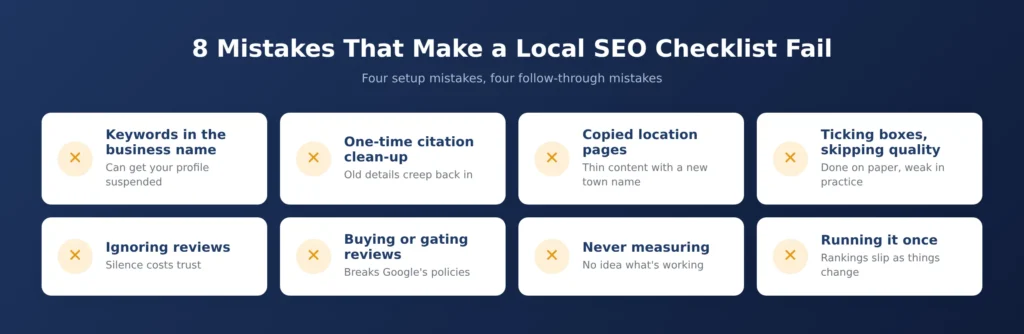
- Adding keywords to the business name: It can get the profile suspended, and the fix is simply to use the real name.
- Treating citations as a one-time job: New listings and data aggregators can reintroduce old details, so consistency needs rechecking.
- Copying location pages: Pages that differ only by town name add little value and read as thin content.
- Checking boxes without checking quality: A category chosen quickly or a description pasted from the website still counts as done on paper but works poorly.
Follow-Through Mistakes
- Never replying to reviews: Silence, especially toward negative feedback, costs trust with the next reader.
- Buying or gating reviews: Both break Google’s policies and put your reputation at risk.
- Never measuring: Without calls, direction requests, and rankings by location, you can’t tell which items are paying off.
- Running the checklist once: Hours change, services change, and competitors keep working, so a yearly check is too slow for most businesses.
How Does Get Me Rank Use a Local SEO Checklist With Clients?
At Get Me Rank, a checklist like this is the starting point for any local engagement, not an add-on at the end. The work begins with an audit of the profile, the website, and the existing listings against the checklist, so we know what’s missing before we recommend anything. From there, the items are put in priority order, with verification and consistent business details first, and the client’s business type decides how much weight each section gets. Businesses that want this handled end to end can see how our local SEO services are set up.
The checklist then becomes a monthly routine instead of a one-off document. Get Me Rank reviews profile performance, listing accuracy, reviews, and local rankings on a set schedule, and updates the list when something changes, such as new hours, a new location, or a new service. Keeping it a living document is what stops local visibility from slipping once the first round of fixes is done.
READY TO GROW?
Want more calls from local search? Book a free strategy call, and we’ll run your business through this checklist and show you which fixes will make the biggest difference first.
FAQs
1. What is a local SEO checklist?
It’s a step-by-step list of tasks that help a business show up in local search results, covering the Google Business Profile, website, citations, reviews, local links, and tracking.
2. What should be on a local SEO checklist?
It should include a verified and fully completed Google Business Profile, consistent name, address, and phone details across directories, location-specific website pages, LocalBusiness schema, a review request process, local links, and monthly tracking of calls, direction requests, and rankings.
3. How do you use a local SEO checklist?
You work through it in priority order, starting with your Google Business Profile and business details, then reviews, location pages, and local links. Tick off each item, note what’s still missing, and review the whole list monthly.
4. What is local SEO for businesses?
Local SEO for businesses is the practice of optimizing your online presence so people searching nearby find you, mainly through your Google Business Profile, consistent listings, reviews, and location-focused website content.
5. How is local business SEO different from regular SEO?
Local business SEO targets searches with local intent and relies heavily on your Google Business Profile, reviews, and citations, while regular SEO focuses more on website content, backlinks, and technical performance for searches that aren’t tied to a place.
6. How often should you review a local SEO checklist?
Review it monthly for most businesses. Check your profile performance, reply to new reviews, confirm your hours and details are correct, and update the list whenever your business changes.
7. Can Get Me Rank help with local SEO for my business?
Yes. Get Me Rank starts by auditing your Google Business Profile, website and listings against this checklist, fixes the gaps in priority order, then runs the checklist as a monthly routine covering your profile, listing accuracy, reviews and local rankings. It’s the same process described in the section above, handled for you end to end.
Conclusion
A checklist like this works because it removes guesswork. Instead of wondering what might be holding your rankings back, you can see exactly which items are done and which aren’t, and fix them in an order that makes sense. Start with your profile and business details, build a steady review habit, and keep the list alive with a monthly check. Local visibility rewards the businesses that keep doing the basics consistently.